Global Packet Statistics
Global packet statistics provide a “high-level” view of simulation behavior, letting you quickly get a sense of whether a simulation is performing as expected. You can use this information as a first step in debugging a model.
This feature collects information on the number of packets created, copied, and destroyed during a simulation. These numbers are broken down by packet format, node, and module. The collected statistics are saved in an output table file with a name of the form <project_name>-<scenario_name>-DES-<run_number>.ot.
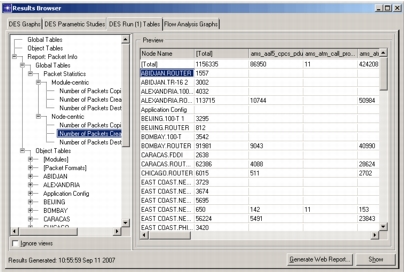
Figure 177: Packet Statistics in Results Browser
Note: When the “sim_packet_sharing” (Packet Data Sharing Mode) preference is set to conservative or full, the content of “copied” packets is shared unless changes are needed. Regardless of this preference, the packet statistics include all packets that were copied or destroyed, as well as those that would have been copied or destroyed if the packet sharing optimization was disabled.
Collecting Global Packet Statistics
Global packet statistics can be collected when running a discrete event simulation using a sequential development kernel. Collection is enabled by default in new simulations.
Use the following procedure to enable/disable the collection of global packet statistics.
Procedure 191: Controlling Collection of Global Packet Statistics
- Open the scenario for which you want to collect global packet statistics.
- Open the Configure/Run DES dialog box (choose DES > Configure/Run Discrete Event Simulation… or click the Configure/Run DES tool button).
- Go to the Outputs > Global Packet Statistics page.
- Select the “Packet info” checkbox to enable collection of global packet statistics, or unselect the checkbox to disable collection.
- Complete any other needed configuration, then run the simulation.
Viewing Global Packet Statistics
Global packet statistics are viewed in the Results Browser on a tabbed page corresponding to the output file name; for example, “DES Run (<run_number>) Tables”. On that page, the treeview node “Report: Packet Info” presents global packet statistics in two ways: in Global Tables and in Object Tables.
Global Tables present the packet statistics for each node or module, broken down by packet format. When you click on the Preview table or the Show button, the table opens in a separate report dialog box. In the report, you can
- click on a red node name to select and show that node in the workspace.
- click on any blue text to open a report that shows an additional breakdown for that row—packet counts for all modules in the node (for node-centric tables) or all nodes containing the module (for module-centric tables).
Object Tables present the packet statistics by module, packet format, or object.