Statistic Animation
To create an animation of a statistic, you must collect that statistic. After turning on collection for the statistic, perform the following procedure to create the statistic's animation.
Procedure 170: Collecting Statistic Animation Data
-
Choose Results > Select Choose Results.
-
Select the desired statistic.
-
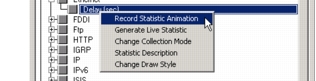
Right-click on the statistic to bring up the statistic pop-up menu.
-
Choose Record Statistic Animation from the statistic pop-up menu.
An A appears beside the checkmark in the checkbox, indicating animation capture is activated for that statistic.
