Analyzing Background Traffic
Background traffic is incorporated into the standard models in two ways: traffic flows (background routed traffic) and baseline loads (background loads). Each of these two approaches has appropriate applications in a simulation study, and in some cases, they can be used together.
This section has the following subsections:
- Using Baseline Loads
- Using Traffic Flows
- Specifying Traffic Flows
- Scaling Traffic—Analyzing the Impact of Traffic Growth
- Creating Cross Traffic for a Specific Network Element
- A Collection Strategy For Background Traffic
- Positioning your Collection Devices
- Synchronizing Traffic Collection
- Managing Redundant Traffic Data
Using Baseline Loads
Baseline loads rely on the user to specify background loads or utilizations on specific network objects. For example, you might want to specify additional traffic loads on one or more links. As explained previously, this means that a mathematical model is used to estimate the effect of the background loads on these links. These background loads affect the explicit traffic that traverses the links, and the effect is to delay that traffic by emulating additional packets queuing for access to each link. For information about how to specify device and link loads, see “Baseline Loads“.
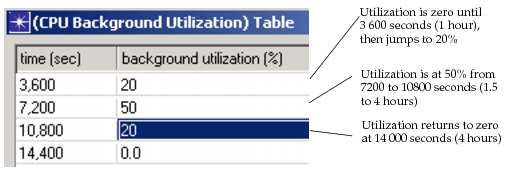
A device load is specified as a table, allowing you to define the utilization or load level as a function of time. The time associated with each level is the time at which that level takes effect. The level is assumed to be zero until the time of the first entry in the table. Similarly, the level holds its value from the time of the last entry until the end of the simulation, provided the simulation has sufficient duration. Figure 1 shows the meaning of this table’s attributes.
Figure 1: Device Loads as a Function of Time
Background loads are provided not only for links, but for some other objects as well. These include LAN objects and servers. In each case, the meaning of a baseline load is the same. The resource of interest is receiving an additional amount of usage, either as a traffic intensity (for link objects) or as a percentage of the maximum throughput (for node objects). Remember that baseline loads are considered in addition to other types of traffic, such as traffic flows and explicit traffic. Therefore, a link with a background load of 2 megabits/second and an explicit load is 1 megabit/second during a specific interval has a total traffic load of 3 megabits/second.
Background loads are useful in the following situations:
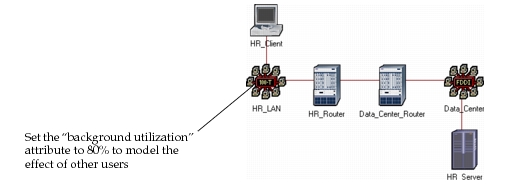
- You already know the utilization of a component that provides a service to some of your explicit traffic—You want to model this “other utilization” analytically to shorten simulation run times. For example, client traffic traverses two LANs and two routers to reach a server. Server traffic also traverses this path in the reverse direction. The client’s LAN is known to be 80% utilized by a large group of workstations. You may use a LAN object and set its “Background Utilization” attribute to 80% beginning at time zero of the simulation. At the same time, you can set up a client and a server and a router to explicitly model the point of view of a particular user, as shown in the following figure.
Figure 2: Using LANs and Background Utilization to Simplify a Network
- You don’t know the utilization of a component, but want to determine the effect of increasing it—For example, what will happen to application response time at various points in your network, if you increase load on the server to 60%, from its current value of 30%. In other words, how sensitive is your application to the server’s performance. If it’s not, and network and protocol effects dominate, it may be pointless to upgrade your server. The “background utilization” attribute on a server represents other tasks contending for the server’s processing bandwidth. As this number increases, tasks submitted by your “stakeholder user” are processed less quickly, reflecting the sharing of the server’s resources with others.