Viewing Inventory Reports
Inventory Reports provide the physical and logical elements of your network in a summary report that you can easily navigate in a web-based format. The reports provide quick summary information as well as details at the device and interface levels.
What are the Key Display Features of Inventory Reports?
You can view a quick summary of all the rules run by rule suite and then drill down to the details, as shown in the following examples.
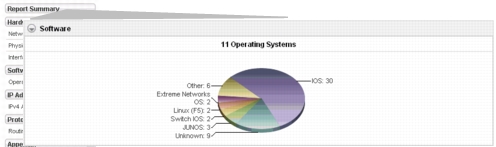
Report Summary Pie Charts by Suite
The Software suit includes an Operating Systems rule. Click in the Pie Chart to view more details.
Tabbed Summaries by Rule
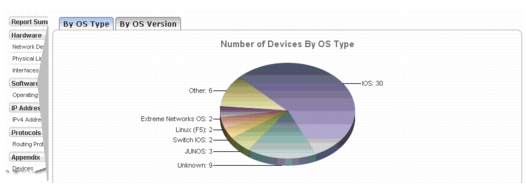
The Operating Systems rule shows tabbed summaries By OS Type and By OS Version.
Inventory Tables by Rule Element
The Inventory Table for the IPv4 Addresses shows a row entry for each IP Address.
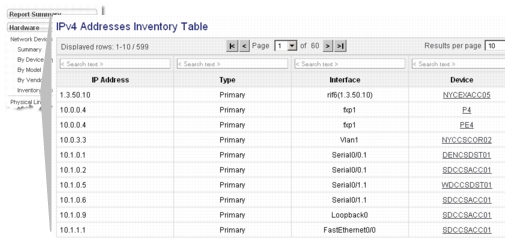
Note: You can use the page navigation at the top or type in the Search Text fields to find elements in the Inventory Tables.
Tip: When you include end systems in your Inventory Report, you might want find the end system with a specific IP address in your network. You can navigate to the End Systems Inventory Table and then use the Search Text field to specify the IP address and quickly find the end system of interest.
Individual Entries by Device
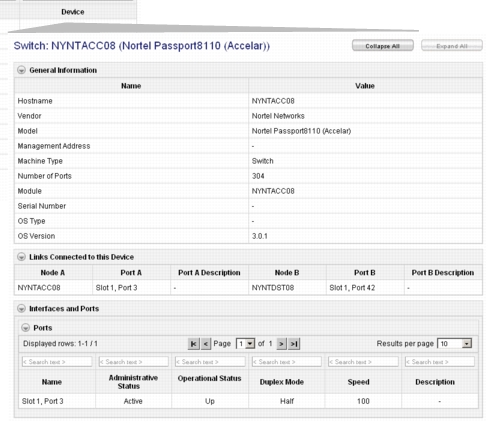
Each device includes a summary page that provides all the inventory details about that particular device.