Setting Attribute Values for One Object
To set the value of an attribute on a single object, use the following procedure.
Procedure 173: Setting Attribute Values for One Object
-
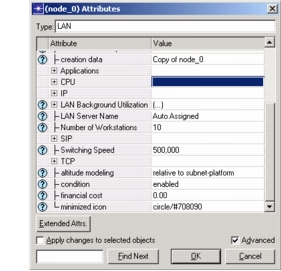
Move the cursor over the desired object and choose Edit Attributes or Advanced Edit Attributes from the Object pop-up menu.
- Edit Attributes opens the object's Attributes dialog box with the primary attributes visible.
- Advanced Edit Attributes opens the dialog box with all of the object's attributes (both primary and secondary) visible.
From either version of the dialog box, you can change the list of attributes displayed by selecting or deselecting the Advanced checkbox.
-
Set an attribute value by clicking in the appropriate cell in the Value column. The editing method may require text editing or selection from a pull-down menu.
-
Click OK to save the changes and close the dialog box.