Simulation Sequence Editor
The Simulation Sequence Editor provides full access to simulation sequences, allowing you to:
- add and delete simulation sets
- edit the attributes of simulation sets
- select a subset of simulation runs to execute
The Simulation Sequence Editor appears instead of the Configure/Run DES dialog box when the "des.configuration_mode" preference is set to "advanced". In addition, you can open a Simulation Sequence Editor at any time in the following ways:
- To edit the simulation sequence for the current scenario – Click the Edit Simulation Sequence… button in the detailed Configure/Run DES dialog box.
- To open any existing simulation sequence – Choose File > Open…, select Simulation Sequence in the "Files of type:" pull-down menu, and select the desired Simulation Sequence from the file list.
- To create a new simulation sequence – Choose File > New… and select Simulation Sequence in the pull-down menu.
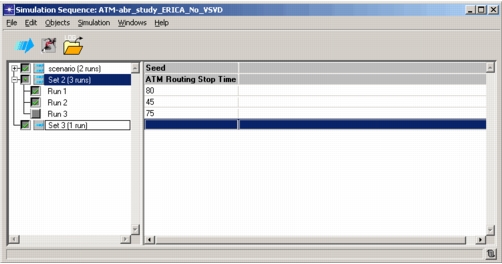
The Simulation Sequence Editor contains a treeview listing the simulation sets in the sequence. Simulation sets that contain multiple runs can be expanded to show each run. If a set contains multiple runs, the area to the right of the treeview shows the name of each attribute with multiple values and the attribute values used for each run. Checkboxes next to each simulation set and run let you specify which runs should be executed.
Figure 237: Simulation Sequence Editor