Choose Individual Statistics
The Choose Individual Statistics operation lets you specify which global or scenario-wide statistics you want to collect during simulation. To specify object statistics, select Choose Results from the "Object Pop-Up Menu". The procedure is the same, regardless of which menu you use.
Note: To collect simulation attribute statistics for a parametric study, use the Choose Statistics (Advanced) operation.
Procedure 130: Collecting Statistics
-
Select Choose Individual Statistics… from one of the following menus:
- To collect global or scenario-wide results, use the DES menu or the Workspace pop-up menu.
- To collect results for a particular node or link, use the Object pop-up menu for that object.
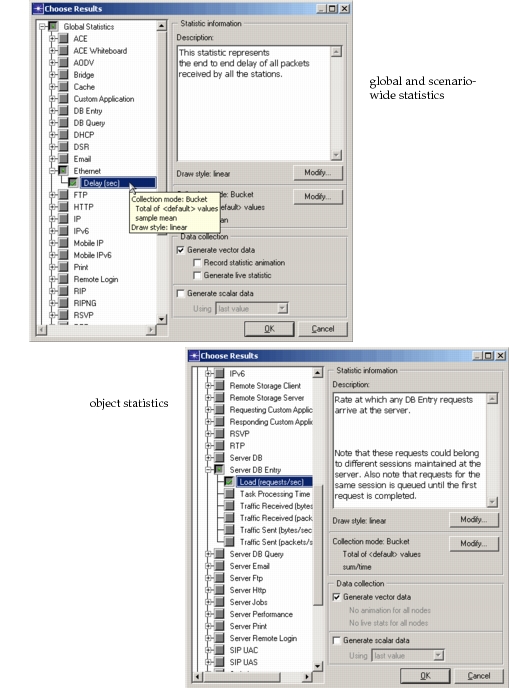
A Choose Results dialog box appears.
Figure 110: Choose Results Dialog Boxes
-
Specify the results you want as follows:
- Click in the box next to a statistic name to select or deselect that statistic for collection. A checkmark appears in the box next to each statistic that will be collected.
- Click in the box next to a statistic group to select or deselect all statistics in that category. A dot appears in the box when at least one of the group’s statistics is selected.
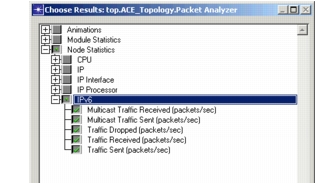
In the preceding figure, the IPv6 statistics are selected.
-
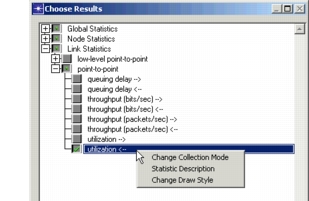
Optionally, right-click on a statistic name to open the Statistic pop-up menu, allowing you to modify how the statistic will be collected or view a description of the statistic. See "Statistic Pop-Up Menu" for details.
-
Click OK to close the dialog box.