Generating a Performance Analysis Web Report
When you generate a Performance Analysis web report, Modeler takes data from the output vector files collected by a simulation run, analyzes the data according to specific rules, and creates HTML formatted pages containing the results of the analyses. You can generate a Performance Analysis web report manually using the most recent simulation results or automatically when a simulation completes.
Note: If you generate reports manually, make sure that the most recent simulation run collected the statistics needed by the report. If it did not, part or all of the report content will be missing.
Use the following procedure to manually generate a Performance Analysis web report.
Procedure 161: Generating a Performance Analysis Web Report Manually
-
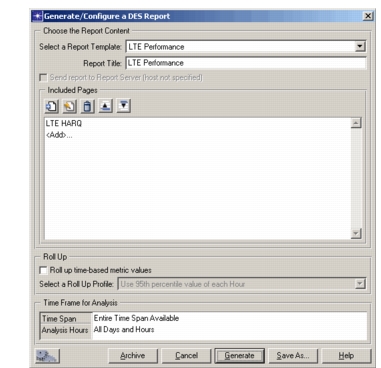
Choose DES > Reports > Performance Analysis Web Report > Create Performance Analysis Web Report…
The Generate/Configure a DES Report dialog box opens.
-
Select one of the available report templates.
-
Specify a title for the report.
-
(Requires Riverbed Report Server functionality) Select whether you want the report sent to Riverbed Report Server.
-
Click Generate.
The web report is created and opens in your web browser. The data contained in the report is that from the most recent simulation run.
Note: If the most recent simulation run did not collect the statistics needed by the report, part or all of the report content will be missing.
Use the following procedure to configure a simulation to automatically collect statistics and generate a Performance Analysis web report when the simulation completes.
Procedure 162: Generating a Performance Analysis Web Report Automatically
-
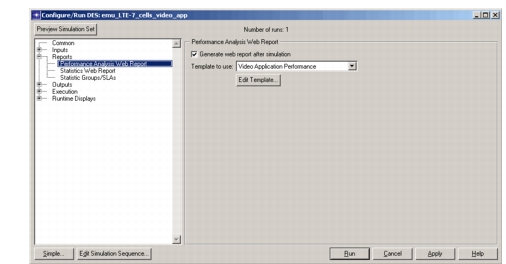
Open the detailed Configure/Run DES dialog box.
-
Select Reports: Performance Analysis Web Report in the treeview.
-
Select the “Generate web report after simulation” checkbox.
-
Choose the template to use.
-
(Optional) Click Edit Template… to customize the template for this simulation, as described in Defining a Performance Analysis Web Report Template.
-
Continue with other configuration options for the simulation, or click Run to start the simulation immediately.
Modeler will automatically collect the statistics needed by the chosen report template and generate a Performance Analysis web report when the simulation run is complete.