Using the Group Hierarchy File
Using the Group Hierarchy file, you can specify reporting groups that can include one or more subgroups. Specify the reporting groups by using “groups” definitions based on the roles available in your network.
Key Concept—You can explicitly define groups using the roles available in the network or use the hierarchical groups defined on NetCollector.
Example Group Hierarchy File
View the example Group Hierarchy files in the following installation directory:
[Install_dir]\models\module_ref\[solution_name]
Figure 15: Example 1 Group Hierarchy File—Explicit Groups Defined—grouping-example.xml
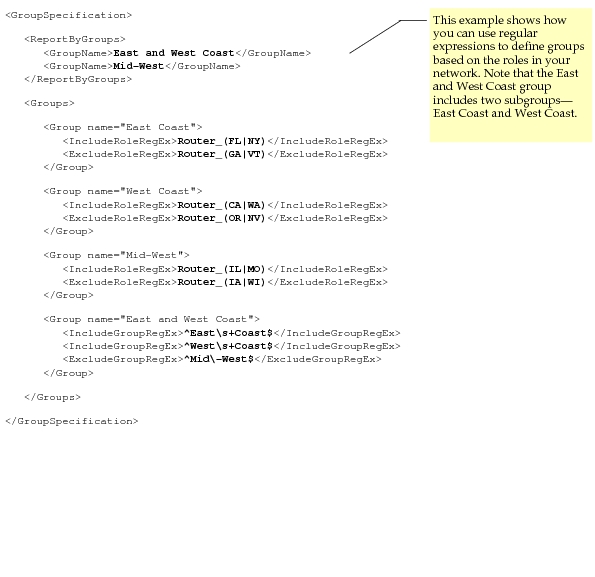
Figure 16: Example 2 Group Hierarchy File—Use NetCollector Groups—grouping_vnes_roles.xml
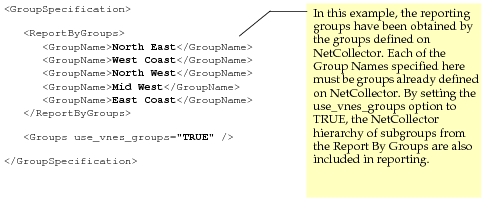
Use the example Group Hierarchy Files shown in the previous figures as a guide for developing your own. For example, open one of these example files and edit the specification to suit the grouping hierarchy that you want to use. You can then save this file to your working directory, typically op_models.
You can then specify this file for the Group Hierarchy File parameter for Inventory Reports, OS Compliance Reports, and Network Difference Reports.
For End System reporting, you must explicitly define roles using the Role Assignment Utility before including them in the Group Hierarchy File definitions. For more information, see “End Systems and Roles“.