Network Whiteboard Editor
Network Whiteboard is an editor that allows you to create and maintain drawings of your network. Network Whiteboard includes the following features:
-
Easy-to-use export of network topology to Network Whiteboard
Creating network drawings is as simple as selecting subnets, showcases, and user-defined reports and clicking a button.
-
Update network drawings with network changes
Network drawings can be updated to include changes in the network. Updating keeps your drawings up-to-date and ready for presentation.
-
Ability to display multiple subnet(s)/showcase(s) per page
Display multiple subnet(s)/showcase(s) on a page for the purpose of comparison or showing a relationship.
-
Ability to print a network drawing or to create a bitmap image
Network drawings can be printed for distribution or archiving. Additionally, you can create bitmap images of your network drawings for inclusion in reports and other documents.
-
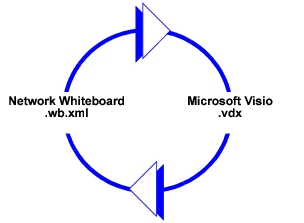
Round-trip between Network Whiteboard and Microsoft Visio
The Network Whiteboard (.wb.xml) file can be exported to a Microsoft Visio .vdx (Visio XML drawing) format file and edited in Microsoft Visio. Then the Visio file can be imported back into Network Whiteboard. The changes made in Visio are preserved.
Note—Some of Visio's more complex options and formulas are not displayed in Network Whiteboard. However, the Visio options and formulas are preserved in the file.
Figure 178: Round-Trip Between Network Whiteboard and Microsoft Visio
This section includes the following topics:
- Overview of the Network Whiteboard Editor – describes the Network Whiteboard Editor window.
- Understanding the Network Whiteboard Editor – describes features and functionality specific to the Network Whiteboard.
- Using the Network Whiteboard (Workflows) – describes typical Network Whiteboard workflows and associated procedures.
- Network Whiteboard Procedures – describes Network Whiteboard procedures, grouped by workflow categories.
- Miscellaneous Network Whiteboard Operations – describes operations not discussed elsewhere.