Probe Editor
While the goals of simulation projects can vary widely, depending upon the user and the application, most have in common the evaluation of some aspect of the modeled system’s behavior or performance. It is therefore important that the simulation environment provide tools that give the user insight into the dynamic operation of the model. Modeler provides several such tools:
- A simulation debugger allows detailed, interactive monitoring of the model’s execution
- Pre-defined and user-defined statistics relating to the model’s behavior and performance may be captured for post-simulation analysis
The most common mechanism supporting the capture of statistical data is through the statistic browser in the Project Editor.
A more advanced mechanism supporting the capture of statistical data, and allowing more specific control, is called a probe, and its use is supported by the Probe Editor.
A probe represents a request by the user to collect a particular piece of data about a simulation. Modeler supports the following types of probes:
- global statistic probe
- node statistic probe
- link statistic probe
- path statistic probe
- demand statistic probe
- coupled node statistic probe
- attribute probe
- automatic animation probe
- statistic animation probe
- custom animation probe
- live statistics probe
Statistic probes collect statistics, which refer to dynamic collections of numeric measurements or recordings. Statistics can represent quantities, such as instantaneous queue size, or the average success rate of packet transmissions over a particular link.
Attribute probes provide a mechanism to record assignments for attributes at various levels of the system model. Although attributes can be thought of as “inputs” of the simulation model, recording them in simulation output files can be useful to correlate their values to resulting output statistics. Attribute probes result in the recording of output scalars.
Animation probes notify the Simulation Kernel to activate the animation features. Using automatic animation probes, users may animate objects such as subnets (to see node movement) or nodes (to see packet flows). Custom animation probes activate user-defined animation procedures that are built in to process models and/or pipeline stages.
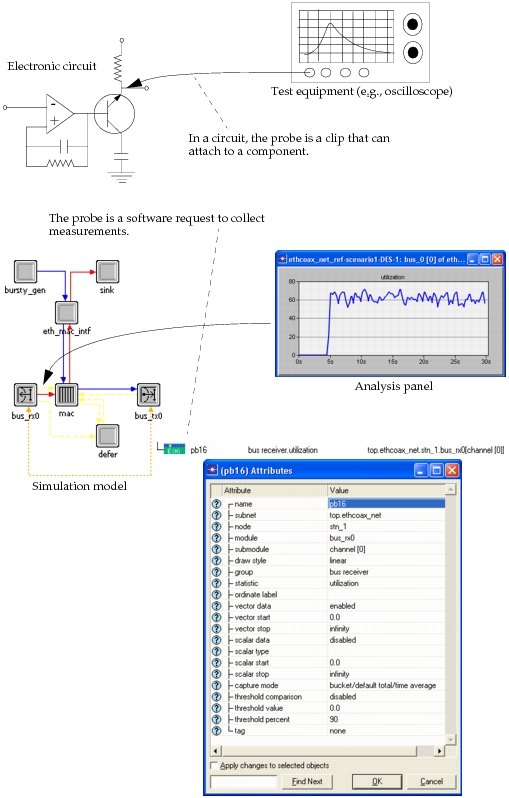
Regardless of whether a probe applies to statistics, attributes, or animation, it can be thought of as an instrument that notifies the Simulation Kernel to enable data collection at precise locations in the modeled system. In this sense, Modeler probes are much like signal probes used for analyzing and debugging electronic circuits. This analogy is illustrated in the following figure.
Figure 234: Signal Probe / Simulation Probe Analogy