Specifying Objects to Always Include/Exclude
When selecting objects by attribute, you can specify objects to always include and never include. Additionally, you can save the set of objects to always include and never include to selection set files. Saving a set of objects to a file allows you to easily and quickly specify the same set of objects in the future.
Note: If the same object is specified in both the always included objects list and the never included objects list, then the never included specification takes precedence and the object is never included when selecting objects by attribute.
Procedure 45: Including/Excluding Objects when Selecting Objects by Attribute
-
Choose Edit > Select Objects.
-
The Define Selection dialog box appears, shown in Figure 25.
-
Click one of the following tabs:
- Always Included Objects – to specify network objects that are always included when selecting objects by attribute, regardless of the selection conditions.
- Never Included Objects – to specify network objects that are always excluded when selecting objects by attribute, regardless of the selection conditions.
-
Click Add…
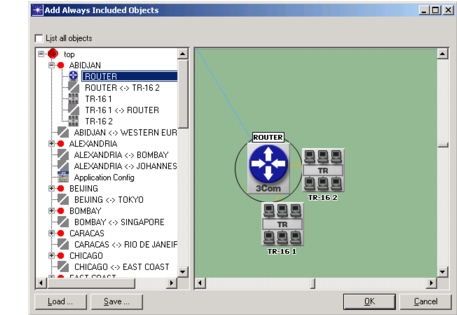
Result: The “Add Always Included Objects” / “Add Never Included Objects” dialog box appears. The following figure shows a typical “Add Always Included Objects” dialog box.
Figure 27: Add Always Included Objects Dialog Box
-
Do one or more of the following:
- Select objects – Select the objects to always/never include. To select multiple objects, hold down the Ctrl key and click on objects. Double-click on an object in the treeview to display the object in the topology view.
- Save selection set – Select objects and click Save… The Save As dialog box prompts for the name of the selection set file and the directory in which to save the file.
- Load select set – Click Load… and from the Apply Selection Sets dialog box, select the selection set to load. Then click Load.
-
On the “Add Always Included Objects” / “Add Never Included Objects” dialog box, click OK.
Result: The selected objects are added to the list on the “Always Included Objects” / “Never Included Objects” tab. The objects in the list are always/never included in a set of objects selected by attribute.
-
Optionally, on the “Always Included Objects” and “Never Included Objects” tabs, use the Copy, Cut, and Past buttons to delete an objects from the list or to move an object from one tab to the other tab.