Declare Packet Formats
This operation enables you to specify packet formats that the process relies upon so that these formats and their associated packet conversion methods will be included in the simulation executable at run time (or optionally at link time for statically-linked simulations).
Excluding a format from the set does not imply that it cannot be included in the simulation, only that it is not required by this particular process model. Included formats can safely be specified and referenced by multiple process models.
Procedure 27: Declaring Packet Formats
-
From the Process Editor, choose File >Declare Packet Formats…
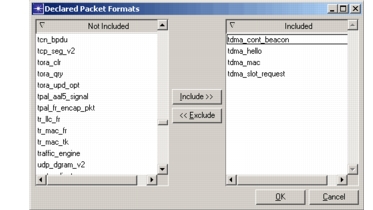
Result: The Declared Packet Formats dialog box opens. This dialog box displays a list of every packet format currently visible in the model directories.
Figure 17: Declared Packet Formats Dialog Box
-
In the Not Included list, select the packet formats you want to include in the simulation. You can
- Type the first few letters of the file name to jump to that file.
- Click multiple files to select them. (Click again to deselect.)
- Double-click a file name to open the file in an editor.
-
Click the Include>> button.
-
Click OK.