Delete Model Files
WARNING: Deleted model files cannot be recovered.
Removes individual project components, such as custom model lists and network models.
Procedure 28: Deleting a Model File
-
Choose File > Manage Model Files > Delete Model Files…
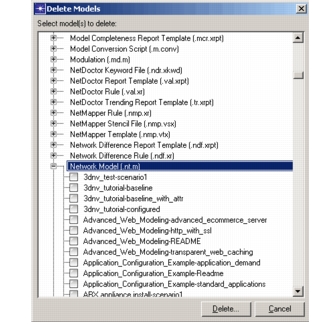
Result: The Delete Models dialog box opens.
-
Find the listing for the type of file you want to delete and expand that node. For example, to delete a node model, expand “Network Model (.nt.m)”.
Figure 18: Delete Models Dialog Box
-
In the list of existing files, select each model file you want to delete.
-
When finished, click Delete…
-
Click Delete to perform the deletion.
Note: The Project model type deletes only files ending in the “.prj” suffix. To delete a project and all associated files, use the Delete Projects operation.