Paste Special…
Note: The Paste Special operation supports only link objects.
You may create links in the network model by copying existing links and pasting them into the Project Editor. When you copy and paste links in the Project Editor, Modeler will paste the link object and the endpoint configuration (including routing protocols and other attributes) to an available port of the same technology and type as the copied link by default. If no port of the same technology and type is available, Modeler creates the port before pasting the endpoint configuration.
Note: If the copied link's endpoint has a valid IP address, the pasted link will have its IP address set to “Auto-assigned”. If the source link has “No IP Address” or “Unnumbered”, the pasted link will use the same value. In the latter case, you will need to auto-assign addresses using the Protocols > IP menus or run Flow Analysis to auto-assign IP addresses.
You can change the default paste behavior by using the Paste Special dialog box (Edit > Paste Special). The Paste Special dialog box (shown in the figure below) lets you specify how you want to paste links, as well as how you want the paste operation to behave in the future. For example, if you want the paste operation to paste link objects only, without configurations, you can change the option to “Paste objects only” and set the checkbox “Use this option for future pastes”.
Figure 23: Paste Special Dialog Box
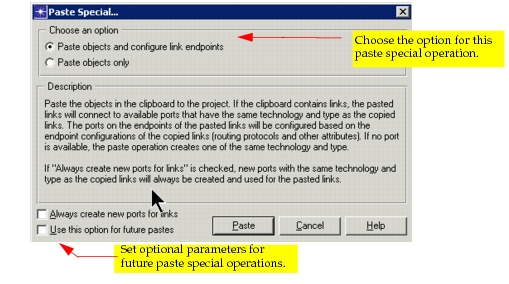
Table 13: Paste Special Dialog Box Options
| Option | Description |
|---|---|
| Paste objects and configure link endpoints | (Default) Pastes the link objects from the clipboard to ports with the same technology and type. Configures the link endpoints with the same attributes as the copied link. If a port of the same technology and type is not available, one will be created¹. |
| Paste objects only | Pastes the link objects only, without configuring the endpoints. If a port of the same technology is not available, one will be created. |
| Always create new ports for links | Selecting this checkbox will enable Modeler to always create a new port of the same technology and type, regardless of the option selected above. |
| Use this option for future pastes | Selecting this checkbox retains any changes you have made to default behavior and applies the new behavior to all future paste operations unless you make changes in this dialog box. |
Note 1: When the new port type is not supported in the destination device (e.g., if you are pasting a link with IP endpoints to a Layer-2 switch), the device type will be upgraded (in such a case, from a switch to a router switch). During this operation, the upgrade attempt may fail, in which case the device will not be upgraded and the new link will not be connected correctly. When an upgrade attempt fails, a message is written to the message buffer indicating the failure.