Declare External Files
External files contain functions and data that are referenced by other simulation components, such as process models. You must declare any external files you are using so that they can be linked into the simulation program. You can declare external files at the project level or in an individual process model. It is not a problem if an external file is declared and referenced in multiple process models. Files to be declared as external must
- reside within the model directories.
- carry the suffix
<arch>.ex.o,<arch>.ex.obj,ex.c, orex.cpp, where<arch>specifies the architecture (see the “arch_suffix” preference for details).
Procedure 26: Declaring External Files
-
From the Process Editor, choose File >Declare External Files…
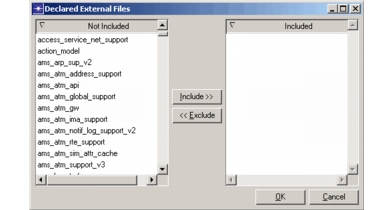
Result: The Declared External Files dialog box opens. This dialog box displays a list of every external object and source file currently visible in the model directories.
Figure 16: Declared External Files Dialog Box
-
In the Not Included list, select the external files you want to include in the simulation. You can
- Type the first few letters of the file name to jump to that file.
- Click multiple files to select them. (Click again to deselect.)
- Double-click a file name to open the file in an editor.
-
Click the Include>> button.
-
Click OK.