Declare Child Process Models
This operation allows you to specify hierarchical relationships between process models. It enables the current process model to act as a parent process by creating and potentially invoking other processes referred to as child processes.
Processor and queue modules declare a root process via the object attribute “process model”. The root process declares child processes through the Declare Child Process Models operation. In turn, the child processes can themselves declare other child processes, and so on.
For more information about child process models, see “Process Domain” on page 165.
Procedure 25: Declaring Child Process Models
-
From the Process Editor, choose File >Declare Child Process Models…
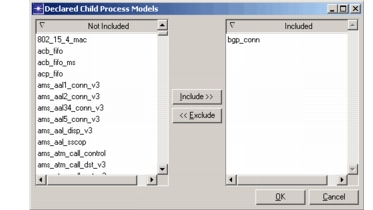
Result: The Declared Child Process Models dialog box opens. This dialog box displays a list of every process model currently visible in the model directories.
Figure 15: Declared Child Process Models Dialog Box
-
In the Not Included list, select the process models you want to include in the simulation. You can
- Type the first few letters of the file name to jump to that file.
- Click multiple files to select them. (Click again to deselect.)
- Double-click a file name to open the file in an editor.
-
Click the Include>> button.
-
Click OK.