Set Background Properties
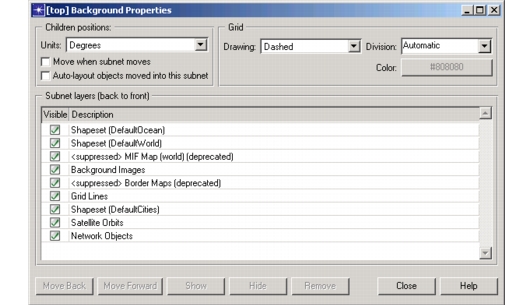
Use the View > Background > Set Properties operation to redefine the appearance of the subnetwork currently displayed in the Project Editor. Typically, background properties are originally set by the Startup Wizard. The following table lists the properties that can be set.
Table 37: Background Properties Dialog Box
| Property | Description |
|---|---|
| Color | Sets the color of the grid lines. |
| Division | Sets the number of units between each grid line. |
| Drawing | Sets the grid lines to be disabled (hidden), solid, or dashed. |
| Subnet Layers | Sets which layers are shown in the network view and the order in which the layers appear. A layer appears in front of (and may obscure) all layers behind it. For more information about layers, see Object Layering. |
| Units | Sets the scale on which the grid is based. By default, the units are the same as the parent subnetwork’s. The units can be degrees, arc seconds, meters, kilometers, feet, or miles. However, in the top subnetwork, the units must be degrees. |
Setting some of the view properties automatically affects other view properties. For example, changing the units will also change the division property to keep the grid lines in the same apparent location. To avoid confusion, you should normally set background properties before creating a model.
This operation does not change the overall scale of an existing network model or the defined distances between nodes. To adjust the distance between nodes after view properties have been changed, drag the objects to the new locations.
Procedure 61: Setting Background Properties
-
Choose View > Background > Set Properties…
Result: A dialog box opens, displaying the properties of the current view.
-
To change units, select an option from the Units pull-down menu. A subnetwork can have units of degrees only if its parent subnetwork has units of degrees.
Figure 45: View Properties Dialog Box
-
Set the Division, Drawing, Color, and Subnet Layers, as necessary.
Result: Changes made to a background property take effect immediately.