Filter Operations
In addition to histogram and probability distribution functions, the Results Browser provides the ability to transform and combine statistic data with a variety of mathematical operators, including arithmetic, calculus, and statistical functions. Statistics and/or vectors may be fed through computational block diagrams called filters to generate and plot new statistics. Filters are developed using the Filter Editor. You apply the filter to a statistic in the Results Browser by selecting the filter from the filter pull-down menu.
Filter Models
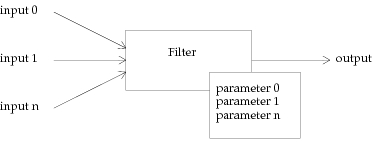
A filter model is a specification for a computation that operates on one or more statistics to create exactly one new statistic. Abstractly, a filter can be thought of as one system that has a defined set of inputs and an algorithm for computing its output. In addition to inputs and outputs, a filter also has associated parameters that may factor into the execution of its algorithm. Inputs and parameters are given names when a filter model is created in the Filter Editor.
Figure 290: Abstract Model of a Filter
Filter Model Structure
Internally, a filter has a hierarchical structure, meaning that it can be composed of other, subordinate filters. These filters can also be composed of other subordinate filters, and so on. A filter that is composed of other filters is referred to as a macro filter. Ultimately, at the lowest levels, all macro filter models must consist of predefined filters provided by Modeler. The available predefined filters are described in Predefined Filters.
To form macro filters, existing filter models are used to create subordinate filters and are attached using filter connections. A filter connection is defined between the output of a filter and the input of another filter to specify the flow of statistic data. Each filter has only one output, but this output can support outgoing connections to any number of destination filters. However, each filter input can be the recipient of at most one connection.
Figure 291: Hierarchical Structure of Filters
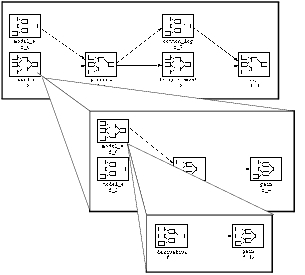
Exactly one output of one subordinate filter must be left unattached when compiling a filter model. This output becomes the output of the encompassing macro filter. Therefore, the subordinate filter with no connections attached to its output is the final subordinate filter that is executed last; the output data is then made available to the encompassing filter or to the Results Browser to create a new panel.
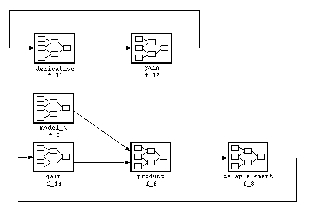
Filter connections may not be used to create feedback paths within a filter model. Feedback paths are individual connections, or sequences of connections that would create a flow of data such that a filter input would receive data more than once in one filter execution. Feedback conditions are detected during the compilation process in the Filter Editor (refer to Filter Execution). Some examples of feedback paths are shown below.
Figure 292: Examples of Feedback in Filter Models
In addition to preventing feedback paths, the Filter Editor also disallows circular inclusion of filter models within macro filters. In other words, a filter model may not appear at any level of depth within its own definition. Therefore if filter model A incorporates a subordinate filter with model B, and model B incorporates model C, then it would be illegal for models B or C to incorporate model A.
Promotion of Filter Inputs and Parameters
Filter parameters and inputs can be “passed up” from subordinate filters to encompassing macro filters via a mechanism called promotion. Promotion for filter models is similar to promotion for modeling attributes in the Process, Node, and Network domains. For a description of the promotion concept as it applies to these domains, see Chapter 4 “Modeling Framework” on page 80. The promotion mechanism allows a property of a lower level object or model to become the property of an encompassing, higher level object.
In the case of a filter, a numeric parameter can be set to the promoted status to automatically become a parameter of the macro filter. That is, the promoted filter parameter will appear in the parameter menu of the macro filter when the latter is deployed as part of a higher-level macro filter, or when it is executed in the Results Browser.
The inputs of a subordinate filter can be promoted simply by leaving them unconnected. In the same manner as promoted parameters, promoted inputs automatically become inputs of the higher-level macro filter. The promotion of an input is apparent in that it appears in the connection input menu of the macro filter when this macro filter is used as a component in a higher-level macro filter model. In addition, promoted inputs are referred to in the Results Browser when the macro filter is executed, to prompt for the selection of an input statistic.
Filter Execution
A filter can only be executed to operate on statistics in the Results Browser if the filter model has been compiled at some earlier time in the Filter Editor. Successful compilation is also required for a macro filter to be usable as a component in a still higher-level macro filter. When a filter model is compiled, all promoted inputs and parameters must be given names. These names serve to identify the inputs and parameters when the filter model is used, both for execution in the Results Browser and for deployment in other filter models.
When a macro filter is executed, all unconnected filter inputs must be provided with either a statistic or a vector from an output vector file. This data, together with assignments for promoted parameters, constitutes the input of the filter’s computation and is responsible for directly or indirectly triggering all computations of subordinate filters. The filter execution method follows the data-flow paradigm, meaning that each subordinate filter may only be executed after all its connections have received data, either directly from the encompassing filter’s inputs, or from another subordinate filter. After a subordinate filter is executed, the new statistic that results from its computation is transferred from its output to each of the connected filter inputs. This may in turn trigger the destination subordinate filters to be executed, provided that their other inputs have also received data.
Execution completes when all subordinate filters have executed. The final filter to executed must have no connection attached to its output. The output that it produces is instead made available to the Results Browser to incorporate into a new panel.