Troubleshooting Traffic-Flow Imports
This section describes some common problems relating to traffic-flow imports and identifies some possible solutions:
- File parsing errors – If a data file cannot be parsed, the file is probably in the wrong format. In this case, do the following:
- Search the Knowledge Base for any relevant information about the type of data you want to import. Riverbed Support maintains answers to common questions and issues involving traffic imports. See Procedure 10 Searching the Riverbed Knowledge Base.
- See the relevant section in the documentation about special requirements and procedures for the file format or product (see How do I import traffic into my network?)
- Data file directory does not appear in the Traffic Flows Import dialog box – The solution to this problem is to specify the directory in your traffic_archive_dir preference (as described in Specifying Traffic File Locations).
Searching the Riverbed Knowledge Base
Procedure 10: Searching the Riverbed Knowledge Base
-
Direct your web browser to the Knowledge Base at https://supportkb.riverbed.com and login with your credentials.
-
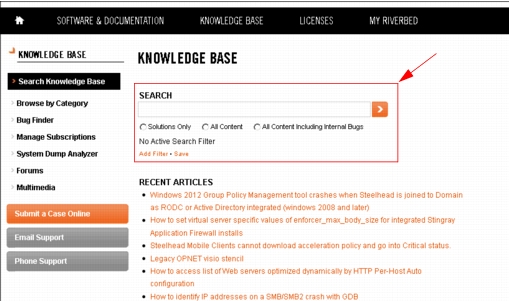
Enter search terms in the Search box, highlighted below.
Figure 20: Riverbed Knowledge Base Searches
- Search for the string “traffic flow imports”.
- Search for the name of the product or format you want to import (for example, “.tr2” or “nGenius”).
For more information, see Viewing and Managing Traffic Flows and Baseline Link Loads.