Mapping “Offnet” Traffic Flows
Collected traffic flow data that does not have enough information to map to a specific source or destination node without using other information is called “offnet traffic,” which can be considered as “external traffic” to the current network model.
In some cases, the source or destination IP address is outside in the network model, and in other cases the source or destination IP address is ambiguous but can be mapped accurately to a part of the network model.
Note: Some vendors refer to “off-net” traffic as traffic flows that go through their network from non-managed sources or destinations, which has a different meaning than the offnet traffic described here.
Traffic Flow Splitting
Traffic flows with source and destination nodes outside the imported network model often have multiple, equally-likely edge nodes for sources and destinations entering and exiting the imported network model.
Imported traffic flows are split between equal cost routes to candidate nodes instead of mapping them to a single candidate node that might not be an actual next hop for that traffic flow in the network model. In the case where the metric cost is less for a candidate node, then all the traffic is mapped to that node instead of splitting up the traffic flow.
Node Skipping
When a candidate node has no IP routing table, the forwarding tables of adjacent nodes determine the traffic flow mapping and the candidate node is skipped. In releases prior to 17.0, the traffic flow terminated at the candidate node instead of skipping and going to a node indicated by the adjacent node forwarding tables.
Using Forwarding Tables to Map Flows
Imported traffic flow records can include source or destination IP addresses for nodes outside the imported network model.
If known, the import process uses the forwarding tables from the device that reports the IP traffic flow records as its “probe” device—mapping the traffic flow according to a graph walk towards the flow endpoint.
When a device that reports the traffic flow records is either not known at all, or if it is known but does not exist in the modeled network, the import process now uses the first device it finds with the source or destination IP address in its forwarding tables as its “probe” device to map the traffic flow based on a graph walk towards the flow endpoint.
Note: The preference, Automatically Select Probe For Offnet Mapping must be set to TRUE (default) for the import process to automatically select a device as the probe source.
Mapping Source-Only Flows for Imported Networks Without Forwarding Tables
In some cases, importing the forwarding tables from the devices in the network is not practical and can be too resource-intensive for the traffic studies that you plan to do.
Instead of relying on forwarding tables to route traffic, you can control if you want the import process to consider the nodes reporting the traffic records as the source-only endpoints of IP traffic flows. You can then run a flow analysis to route the traffic for your traffic routing and planning analysis.
Note: The preference, Use Probe As Source of the Flows must be set to TRUE and you must set the traffic import Advanced Flow Import Option to “Represent source-only unmapped traffic flows,” as Always to map flows as source-only flows without forwarding tables.
Source-Only Traffic Flows
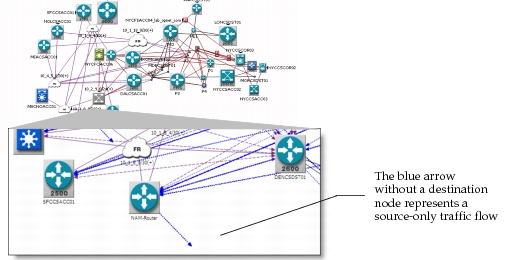
You can represent offnet traffic flows as “source-only” when destination nodes are outside the network, as shown in the following figure.
Figure 4: Source-Only Traffic Flows Example
Select the options for source-only traffic flows using either Import from NetCollector or the Traffic Menu (using eXpress Data Import), as shown in the following figure.
Figure 5: Advanced Flow Import Options
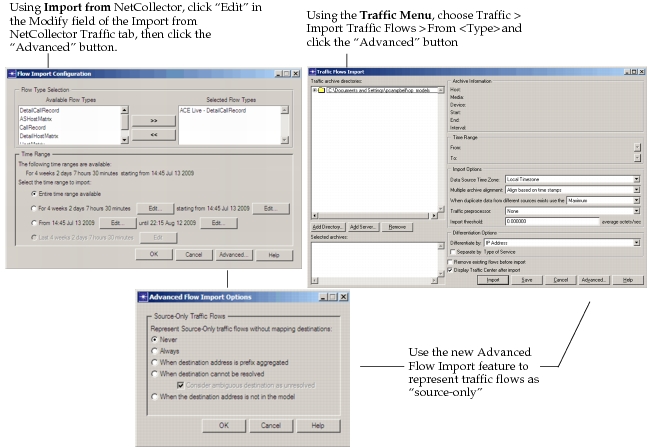
When you run a flow analysis, source-only traffic flows can model traffic in the same way as flows that are mapped to both source and destination nodes. See the next section for descriptions of the options for source-only traffic flows.
Advanced Flow Import Options
Specify how you want to represent “source-only” traffic flows by clicking “Advanced” in the Import Traffic Flows dialog box, as shown in Figure 2-5.
Depending on the network configuration, consider the following configuration settings for source-only traffic flows:
- Never (default) – when traffic routes do not fluctuate based on the network configuration
- Always – when most offnet traffic routes fluctuate depending on the network configuration
- When destination address is prefix aggregated – when offnet traffic has been mapped to aggregated prefix destinations that fluctuate
- When destinations cannot be resolved – when offnet traffic cannot be mapped to a specific node
- When the destination address is not in the model – when the offnet traffic has destinations outside the network model
Reducing Unnecessary Traffic Data
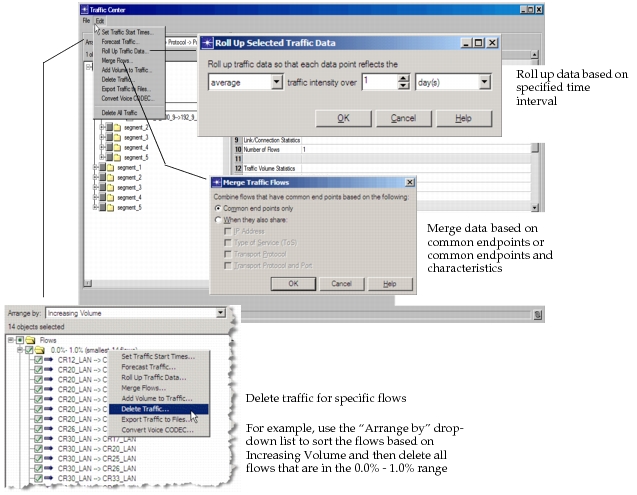
From the Edit menu, you have options to roll up data, merge data, or delete data as shown in the following figure.
Figure 6: Reducing Traffic Data in Traffic Center
Roll Up Selected Traffic Data
Roll up data into equal sized buckets in traffic profiles attributes of selected objects. This is useful if you need to reduce system resources required to run simulation studies. The trade-off is a reduction in the data granularity.
Merge Selected Flows
Combine selected traffic flows that have common endpoints only or common endpoints and specific characteristics. This operation is useful when you have multiple flows between the same node/destination and you want to reduce the number of flow objects in the scenario.
Delete Traffic on Selected Objects
Consider the following two cases:
- If a traffic flow is selected, this operation deletes the object entirely.
- If a link, connection, or path is selected, this operation clears the traffic data on that object.
WARNING: None of these traffic operations can be undone.
For more information, see Unmapped Traffic.