Create IP Flows
The menu operations within Create IP Flows let you create IP Unicast, IP Multicast, and voice over IP (VoIP) traffic flows. These operations are useful for quickly loading a network with a particular type of traffic. The traffic flows created have different characteristics based on the type of demand (unicast, multicast, or VoIP). The demands created from a single Create IP Flows operation are configured identically. You can modify individual demands by editing the attributes of the demand.
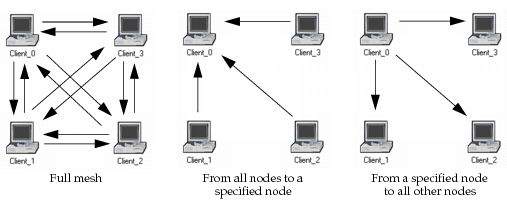
You can create traffic flows in a full mesh, from a single node to all other nodes, or from all nodes to a single node, as shown in the following figure.
Figure 92: Connectivity Options
Unicast Flows
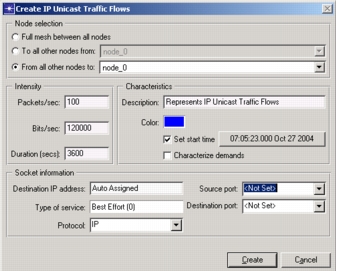
Unicast flows represent traffic between two specific IP addresses. Traffic intensity is configured in packets/sec and bits/sec and packet size is computed as a ratio of these two values. You can also configure socket information such as port and protocol. The destination IP address for the demands can be set explicitly or automatically assigned.
Figure 93: Configuration Options for Creating Unicast Traffic Flows
IP Multicast Flows
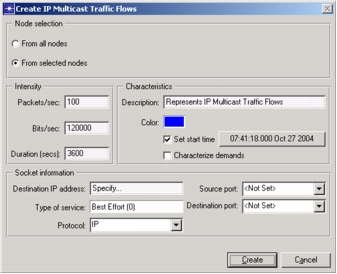
Multicast flows represent traffic between a node and multiple receivers with multicast IP addresses. Traffic intensity is configured in packets/sec and bits/sec and packet size is computed as a ratio of these two values. You can also configure socket information such as port and protocol. When setting the destination field, make sure that the address is a valid multicast address.
Figure 94: Configuration Options for Creating Multicast Traffic Flows
VoIP Flows
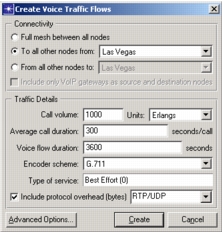
VoIP flows are configured between IP nodes, VoIP gateway nodes, or a combination of these two. When configuring VoIP flows, traffic intensity is specified using erlangs, CCS, or calls/hour—traffic intensity is converted internally and represented on the demands as packets/sec and bits/sec.
Figure 95: Configuration Options for Creating VoIP Traffic Flows
MPLS VPN Flows
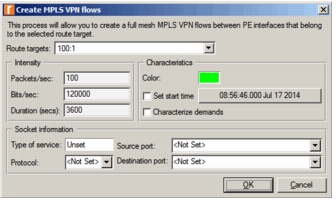
MPLS VPN flows are configured between layer-3 devices that have MPLS VPN configurations.
Figure 96: Configuration Options for Creating MPLS VPN Traffic Flows