Create Custom Device Model
In addition to using the built-in model objects and creating derived models, you can create your own new device models using the Create Custom Device Model operation.
Device Creator allows you to create several different types of network components, including routers, bridges, hubs, workstations, servers, and switches. The following table lists the device categories and the technologies or device types supported by Device Creator.
Table 45: Supported Device Classes
| Device Category | Supported Technologies or Device Types |
|---|---|
| Bridge | Ethernet (10BaseT, 100BaseT, 1000BaseX) FDDI Token Ring |
| Cellular Network Infrastructure | UMTS (RNC, SGSN, RNC without IP) LTE (single-, 3-, and 6-sector eNodeB; EPC; UE Router) |
| Cloud | ATM Frame Relay SLIP Multiprotocol |
| Fibre Channel Devices | Hub Switch Endnode Multihomed Endnode Note: You must have a Fibre Channel switch between an endnode and Fibre Channel gateway |
| Firewall | ATM Ethernet (10BaseT, 100BaseT, 1000BaseX), Ethernet LANE, and EtherChannel FDDI Frame Relay SLIP Token Ring and TR LANE |
| Hub | Ethernet (10BaseT, 100BaseT, 1000BaseX) FDDI Fibre Channel Token Ring |
| LAN Model | Shared Switched |
| Mainframes | ATM Ethernet (10BaseT, 100BaseT, 1000BaseX), Ethernet LANE, and EtherChannel FDDI Frame Relay Fibre Channel SLIP Token Ring and TR LANE Wireless LAN |
| Multihomed Host | Client Server |
| Multi-Service Switch | Circuit Switched Ethernet (10BaseT, 100BaseT, 1000BaseX) and EtherChannel FDDI Frame Relay SLIP Token Ring Voice over ATM |
| Router | ATM Ethernet (10BaseT, 100BaseT, 1000BaseX), Ethernet LANE, and EtherChannel FDDI Frame Relay SLIP Token Ring and TR LANE Wireless LAN |
| Switch | ATM Ethernet (10BaseT, 100BaseT, 1000BaseX) and EtherChannel FDDI Fibre Channel Frame Relay Frame Relay / ATM LANE (Ethernet, Token Ring) Multiprotocol Switch Multi-Service Layer-2 Switch SSP Token Ring UMTS RNC |
| Vendor Device | 3Com Avici Systems Bay Networks Cabletron Cisco eXtreme Networks Fore Systems Foundry Networks Hewlett-Packard Huawei Juniper Networks Lucent (Ascend) Newbridge NEC Nortel Networks |
Models created with the device creator have several advantages:
- They make it easy to configure new models for specialized needs and integrate them into your network models.
- They create both a derived model and a base model, so that you may use either depending on the modeling requirements.
- They support inheritance, so that changes to the original (parent) models can automatically affect all models derived from it.
Model Names
As with derived models, you can give a model created with Device Creator any name that does not duplicate the name of an existing base or derived model of the same type.
Creating a Custom Device
Use the following procedure to create a custom device model.
Procedure 91: Creating a Node Using Device Creator
- Choose Topology > Device Creator > Create Custom Device Model…
-
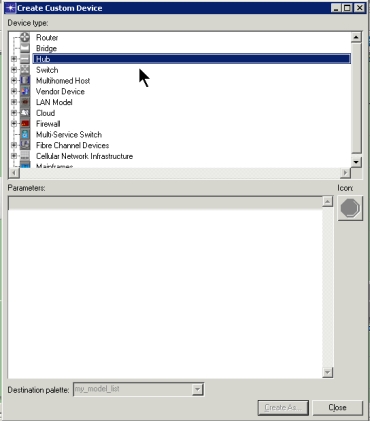
The Create Custom Device dialog box opens.
-
- From the tree, select the type of device that you want to create. If your selection expands a branch of the tree, continue to select the option corresponding to the device that you want to create. Your selection is complete when the parameters for your selection appear in the Parameters pane.
- Define the parameters for the selected device.
- In the “Destination palette” field, specify an Object Palette for the device, then click the Create As button. The default palette is “my_model_list”.
- In the Enter Model Name For Device dialog box, specify a model name for your new device (the default is “my_<device_type>”), then click OK.
- The custom model appears in the specified object palette with the specified name.