Setting the Font
This operation allows you to change the font used to display all text in the current file. You cannot use different fonts in the same file.
You can specify the type family (such as Courier, Helvetica, or Palatino), the display face (bold, oblique), and the size of the text display.
Procedure 14: Specifying the Display Font of a Text Edit Pad
-
Choose Options > Set Font.
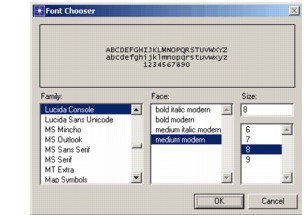
Result: The Font Chooser dialog box opens. A sample of the current font appears in the display area.
Figure 7: Font Chooser Dialog Box
-
Select the desired type family, face, and size, then click OK. Some type families will have only certain faces or sizes.
Result: The text in the text edit pad changes to reflect the new font.