Packet Format Editor
The Packet Format Editor provides a way to specify the collection of fields contained by a formatted packet. Each field has attributes specifying its name, type, size, and default value. Modeling each field’s size allows the overall size of the packet to be calculated. Fields may be one of several types: integer, double, structure, information, and packet.
- Structure fields allow inclusion of arbitrary complex data in packets.
- Information fields model bulk data in terms of its size, without concern for actual content.
- Packet fields model packet encapsulation by layered protocols.
Packet Format Editor Objects
The Packet Format Editor uses only one object: the packet field. Each field’s color can be set, but the size of the field on the screen depends on the field’s assigned length.
Table 16: Packet Format Objects
| Object Type | Definition | Representation |
|---|---|---|
| Packet field | The packet field object represents one field in a packet format. You can specify such attributes as the field’s name, data type, size in bits, default value, and color. | 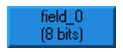 |
Packet Format Editor Operations
The Packet Format Editor provides operations to support the creation and editing of packet fields. Operations related to major capabilities are summarized in the following table.
Table 17: Packet Format Editor Operations
| Operation | Description |
|---|---|
| Create new field | Create graphical representations of new fields and place them in the workspace. |
| Edit field attributes | View or modify a field’s attributes. Changes made to one field can optionally be applied to an entire set of selected fields. |
| Edit packet attributes | View or modify attributes pertaining to the entire packet. |
For a complete listing of operations and an in-depth explanation of their usage, see “Packet Format Editor” on page 530.