Process Editor
The Process Editor is used to specify the behavior of process models. Process models are instantiated as processes in the Node Domain and exist within processor, queue, and esys modules. Processes can be independently executing threads of control that do general communications and data processing functions. They can represent functionality that would be implemented both in hardware and in software. In addition to the behavior of a process, the process model developer defines the model’s interfaces, which determines what aspects of the process model are visible to its user. This includes the attributes and statistics of the process model. This section summarizes the objects used in the Process Editor and the operations that it provides.
Process Editor Objects
Process models use a finite state machine (FSM) paradigm to express behavior that depends on current state and new stimuli. FSMs are represented using a state transition diagram (STD) notation. The states of the process and the transitions between them are depicted as graphical objects. The objects used to build process models are listed in the following table.
Table 13: Process Model Objects
| Object Type | Definition | Representation |
|---|---|---|
| State | Represents a mode of the process which has been attained due to previous stimuli and corresponding decisions. States contain code expressing processing that is performed immediately after they are entered, or immediately before they are exited. A state can be forced or unforced. A process blocks immediately upon executing the enter code of an unforced state, at which point it waits for a new interrupt before continuing. |  |
| Transition | Indicates a possible path that a process can take from a source state to a destination state. Each state can be the source and destination of any number of transitions. A transition has a condition statement which specifies the requirements for the process to follow the transition. An executive statement specifies actions that are to be taken when the process does follow the transition. | 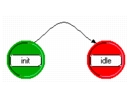 |
| Model-level information “blocks” | Several blocks of text specify additional components of the process, including: declaration of state (persistent), and temporary (scratch) variables; user-defined functions that can be called by the process’ states and transitions; code to be executed upon process termination; and declaration of globally-scoped variables, data structures, etc. | 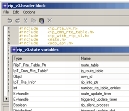 |
Process Editor Operations
The Process Editor provides operations to support the creation and editing of process models. Operations related to major capabilities are listed in the following table.
Table 14: Process Editor Operations
| Operation¹ | Description |
|---|---|
| Create object | Individual operations are provided to support the graphical creation of states and transitions. |
| Edit object | Right-click on an object to view or modify its attributes. Changes made to one object can optionally be applied to an entire set of selected objects. For states, this operation provides access to enter and exit executive code blocks, as well as other attributes. For transitions, it includes access to condition and executive statements. |
| Set initial state | Designates a particular state as the state where a process should begin execution when it is created. |
| Edit model attributes | Process model attributes are parameters of the process, allowing some aspects of its behavior to be controlled externally. These attributes form part of the model’s interface and are scoped locally to the process’ instance. |
| Edit simulation attributes | Simulation attributes are parameters needed by the process, but scoped to the overall system model. That is, the same attribute is shared by multiple processes and has one value throughout the entire simulation. |
| Edit model attribute interfaces | Process models contain no objects with promotable attributes. Only model attributes may be promoted. However this operation is still useful to control attributes that are intrinsic to the processor or queue that receives the process model. For example, the process model can dictate how many subqueues the queue should contain. This operation also hides unnecessary attributes of the modules. |
| Edit statistics | Process models declare statistics that they are responsible for computing. These statistics can be scoped locally (contributed to only by this process) or globally (shared across the entire system model). Declaring statistics makes them available in the Node Domain for statistic wire connections and in the Probe Editor for statistic collection specification. |
| Declare external object files | The code in process models may rely on externally defined functions and data. Each process model declares those external object files that it requires to be included in the simulation program. |
| Compile process model | Generates a C/C++ file that integrates all graphical and code elements of the process model. Then compiles the C/C++ file to prepare it for inclusion in a simulation program. Reports compilation errors if any. |
- Operation names are not exact and may refer to several actual operations as a group.
For a complete listing of operations and an in-depth explanation of their usage, see “Process Editor”.