Demand Model Options
Each flow model has a set of options that determine the type of flow object you can create. You can view model options in the Demand Model Description dialog box, which you open by right-clicking on a model in the object palette.
Figure 10: Demand Model Description Dialog Box
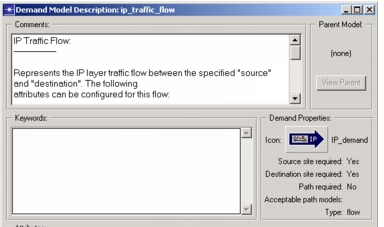
Before you create a flow, verify that the underlying model options support the kind of object you want to create. The three most import considerations are the demand type (connection or flow), the supported attributes, and whether the demand requires an associated path object.
Demand Types: Connections and Flows
There are two types of demand objects:
- Connection – Connections are useful for defining pipelines or reservations between nodes such as PVCs or reserved bandwidths.
- Flows – Flows are useful for defining end-to-end background traffic. A traffic flow generally defines two nodes (traffic source and destination) and one or more traffic profiles that specify the rate of traffic.
Typically, flows are a better choice to model traffic flows.
Traffic Profiles
Before you create a demand object, check the attribute list of the model you plan to use to ensure that the model has the correct profile type. For example, if you want to specify traffic in bits-per-second, be sure to choose a model that includes that attribute.
Point Demands
Some demands, such as those used for multicast traffic, have only a source. Others might have only a destination. You can recognize such point demands in the Demand Model Description dialog box because only one of the "Source site required" and "Destination site required" properties will be set to Yes.
Demands and Paths
If a demand is not associated with a path object, the routing protocols in your network determine the path that the traffic takes.
If you want the traffic to take a specific route, you can have a path refer to a path object. In some cases, this is required: the "Path required" model option determines whether a demand requires an associated path. A demand may also be restricted to certain types of paths, as specified by the "Acceptable path models" option.