Importing Traffic after the Topology Using eXpress Data Import
Using eXpress Data Import
Configure traffic import by choosing Traffic > Import Traffic Flows or Import Baseline Loads.
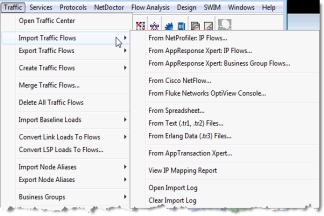
Importing Traffic Flows from Vendor Sources
Detailed Instructions
- “Importing SteelCentral AppResponse Traffic Files“
- “Creating NetFlow Collector Data“
- “Creating OptiView Console Traffic Files“
- “Importing Traffic Flows from Transaction Analyzer Files“
Where to start...
Choose Traffic > Import Traffic Flows
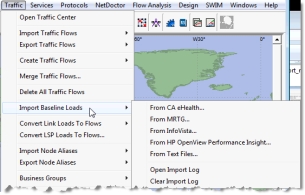
Importing Baseline Loads from Vendor Sources
Detailed Instructions
- “CA eHealth Baseline Loads: Preparing for an Import“
- “InfoVista Link Loads: Preparing for an Import“
- “MRTG Link Loads: Preparing for an Import“
- “Performance Insight Link Loads: Preparing for an Import“
Choose Traffic > Import Baseline Loads
Specific Workflow for Importing Network Traffic:
- “Importing Network Traffic“
For a complete list of vendor traffic import support, see What supported vendor sources can I use?
For information about preparing for import, see “Importing Network Traffic“.
For information about how traffic maps to source and destination nodes in your imported network, see “Mapping “Offnet” Traffic Flows“.
Key Concept— “Traffic Flows“ route traffic from source nodes to one or more destination nodes in your network model; “Baseline Loads“ use traffic utilization metrics as the link loads in your network model.
Traffic Flow Import and Automation
You can configure importing the following traffic flows as an Automation step for the following type of traffic sources:
- NetProfiler: IP Flows
- AppResponse: IP Flows
- AppResponse: Business Group Flows
- Cisco NetFlow
- Fluke Networks OptiView Console
- Text (.tr1,.tr2) Files
- Erlang data (.tr3) Files
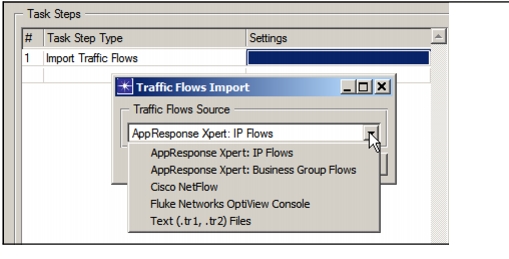
Choose “Import Traffic Flows” and then “New” to select the Traffic Flows Source, as shown in the following figure.
Figure 2: Import Traffic Flows Step
Alternatively, you can create an automation (.af) file when you configure the settings from the Traffic menu. For example, choose Traffic > Import Traffic Flows > From AppResponse Xpert: IP Flows, configure your setttings and then choose the “gear” icon to save the automation file for use in the settings of an Import Traffic Flows step, as shown in the following figure.
Figure 3: Automation Gear Icon

For more information, see:
For more details, see “Importing Network Traffic“ and “Modeling Network Traffic“.
Related Topics: