Running Simulations with Check Point FireWall-1
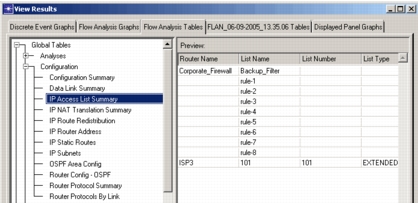
Support is included for running DES and Flow Analysis against network models including FireWall-1. Simulations leverage NAT and anti-spoofing rules to assist you in validating the security of your network. Figure 124 shows the IP Access List Summary table after running Flow Analysis on the network model displayed in the following figure.
Figure 123: Network Model Containing FireWall-1
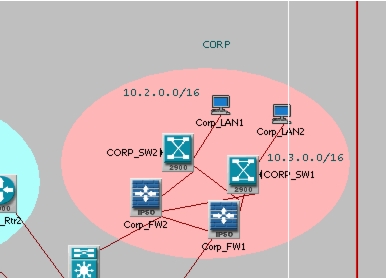
Figure 124: Flow Analysis Tables – Access List Summary
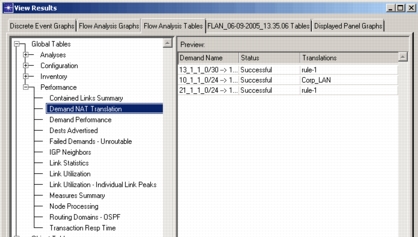
The following figure shows Flow Analysis tables containing the details of successful NAT on several demands. The analysis shows the original and translated source and destination addresses for the demand, as well as the translation mode.
Figure 125: Flow Analysis Tables - NAT
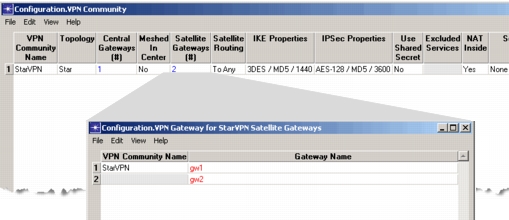
Two reports are available for VPNs: VPN Community and VPN Domain. The VPN Community report, shown in Figure 126, allows you to drill down to the different VPN communities that are configured and to see which gateways are part of the community.
Figure 126: Flow Analysis Tables – VPN
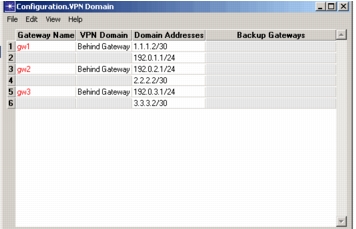
The VPN Domain report, shown in Figure 127, displays the interface addresses that are included in the VPN for each VPN gateway.
Figure 127: Flow Analysis Tables – VPN Domain
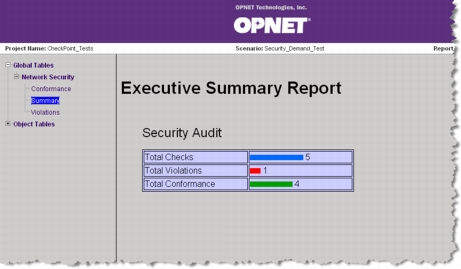
By creating security demands in your network model, you can run audits against the model to discover any insufficiencies in the security rule base on your firewall.
Figure 128: Security Analysis Report
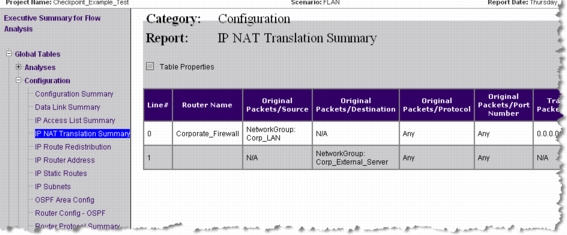
Flow Analysis web reports, like the one shown in the following figure, can provide you with detailed management reports containing information such as an IP NAT Translation Summary.
Figure 129: Flow Analysis Web Report