Global Properties Support for FireWall-1
When configuring security policies on FireWall-1, administrators set global properties in Policy > Global Properties. These properties specify certain constants in the way FireWall-1 should deal with all communications through the firewall. FireWall-1 creates rules in the security rule base from the values in these properties.
Each of the supported global properties maps to a compound attribute. These attributes are contained in Security > Firewall Parameters > CheckPoint Global Properties, as shown in the following figure.
Figure 96: Supported Global Properties
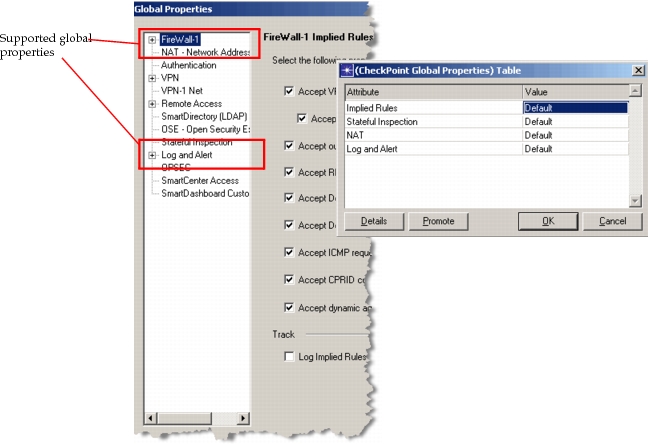
Each row in this table contains more attributes that correspond to specific global properties in FireWall-1. These compound attributes are described further in the following sections.
Implied Rules
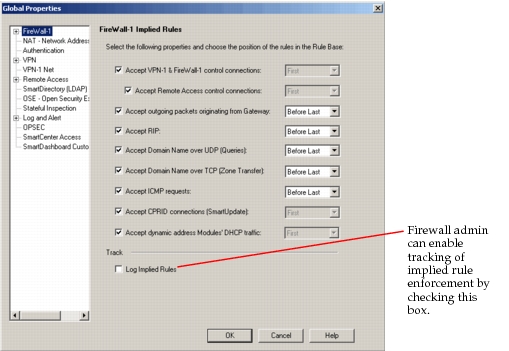
The configuration of the implied rules in FireWall-1 specifies the kinds of traffic that are generally allowed by the firewall and defines the order in which each rule is applied. For example, the firewall administrator may specify that ICMP requests are allowed “Before Last”. This means that after all other implied and explicitly-defined rules are executed, this implied rule is executed before the last rule of the security rule base. This lets the administrator define more specific rules earlier in the rule base (i.e., denying ICMP requests from particular networks).
The FireWall-1 Implied Rules dialog box appears, as shown in the following figure.
Figure 97: Implied Rules in FireWall-1
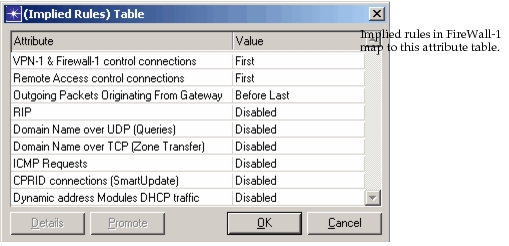
The properties defined in FireWall-1 implied rules map to the compound attribute “Implied Rules”, shown in Figure 98. Each implied rule in FireWall-1 is mapped to a matching attribute.
Figure 98: Implied Rules
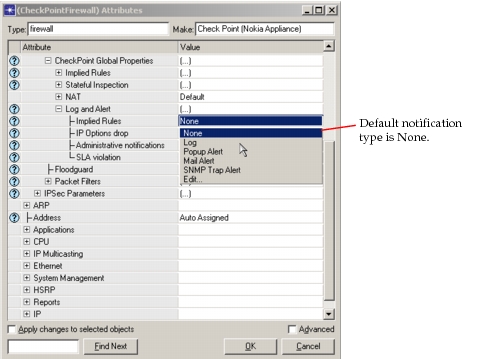
If tracking is enabled by selecting “Log Implied Rules” in the dialog box shown in Figure 97, a corresponding attribute is enabled in Security > Firewall Parameters > CheckPoint Global Properties > Log and Alert.
Figure 99: Tracking Attribute for Implied Rules
Stateful Inspection
Check Point FireWall-1 uses the concept of “stateful inspection” of packets. This means that packets are considered based on the context of the connection. When the first packet arrives, it is checked against the security rule base. Every packet of that connection after the first packet is considered based on how the first packet was handled. The firewall administrator configures the stateful inspection rules in the Global Properties dialog box, as shown in the following figure.
Figure 100: Stateful Inspection in FireWall-1
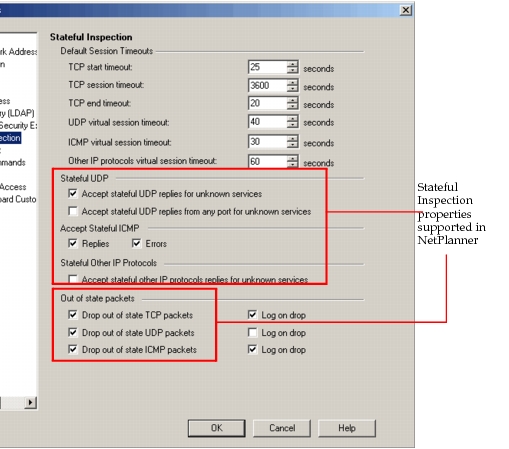
Note: “Log on drop” settings are not imported into or used by NetPlanner.
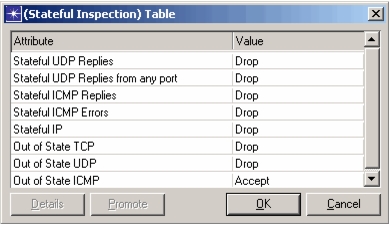
Some of the properties defined in FireWall-1 Stateful Inspection map to the compound attribute “Stateful Inspection”, shown in the following figure. Certain types of stateful or out-of-state packets are accepted or dropped based on the imported firewall configuration.
Figure 101: Stateful Inspection
Network Address Translation
Network address translation (NAT) is one way to provide an additional layer of security to network data.
Check Point FireWall-1 supports two kinds of NAT:
- Static NAT – Each private IP address inside the network uses a corresponding public IP address that allows private, non-unique address to be used behind the firewall. This is also known as one-to-one NAT.
- Hide NAT – Each private IP address inside the network “hides” behind a single, public address on the firewall. The firewall keeps track of the port assignments for the sessions using hide NAT. This is also known as many-to-one NAT.
The use of translated addresses not only provides an extra layer of security but also lets network administrators use RFC1918 addresses inside the network without preventing external access. Packets from non-unique addresses use a publicly routable address when destined for an external address.
In Global Properties > NAT, the firewall administrator can set the following Automatic NAT rules properties, which are imported.
- Allow bi-directional NAT – This setting allows two rules in the Address Translation rule base to match a connection. In this way, if both the source and destination addresses are using automatic NAT, both have a rule that translates their address. Without this property enabled, only one side of the connection is translated, resulting in incomplete translation.
- Translate destination on client side – This setting causes NAT for the destination address to be performed at the interface on the client side.
- Automatic ARP configuration – When this setting is enabled, the FireWall-1 gateway answers all ARP request for machines using NAT.
These global properties for NAT are configurable on FireWall-1 in the Global Properties > NAT - Network Address Translation tab, as shown in the following figure.
Figure 102: Network Address Translation in FireWall-1 Global Properties
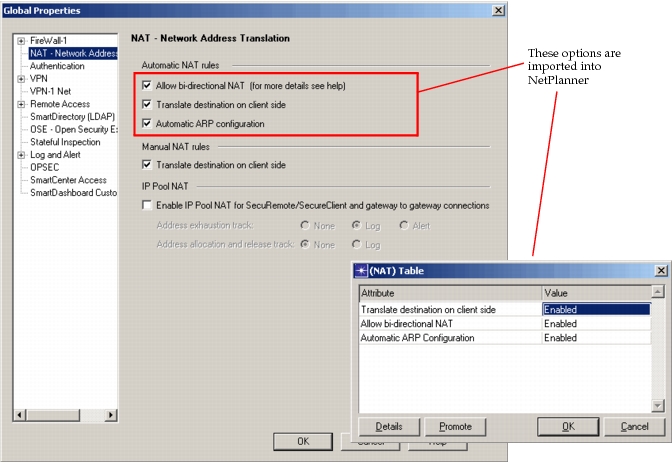
In FireWall-1, these settings apply to automatic and manual NAT rules, which are discussed more in Address Translation Rule Base. Only the global properties for automatic NAT rules are imported. When set in FireWall-1, the global properties are mapped to the compound attribute Security > Firewall Parameters > CheckPoint Global Properties > NAT.
Log and Alert
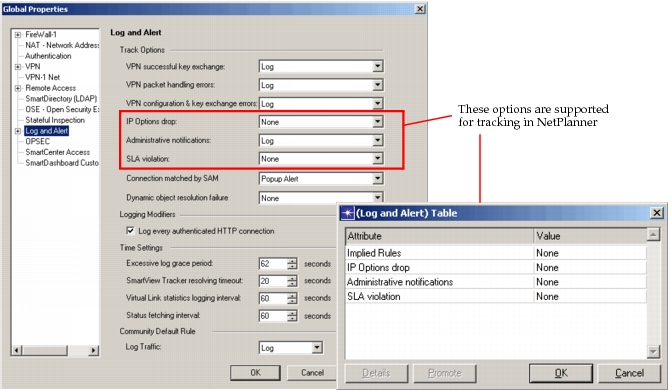
In addition to the tracking supported for implied rules, described in Implied Rules, three other tracking options are supported. Notification support is the same as for Implied Rules.
- IP Options drop
- Administrative notifications
- SLA violations
Figure 103: Log and Alert Configuration in FireWall-1