Report Server Publication Settings
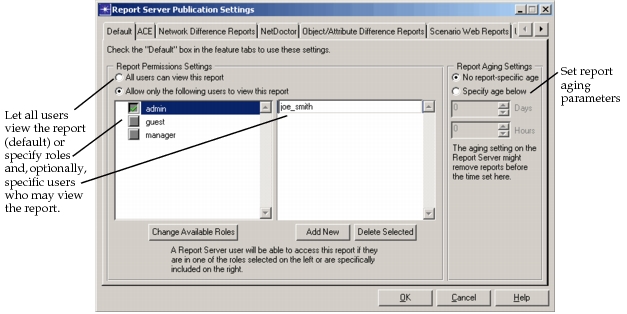
For information security, you can restrict the viewing of reports published from Modeler to Report Server by setting report viewing permissions in Modeler based on Report Server username or role. You can also customize the aging of a report by modifying the settings. Access this dialog box from the Riverbed Modeler startup screen, using Edit > Report Server Publication Settings.
Figure 539: Report Server Publication Settings
Report Type Tab Settings
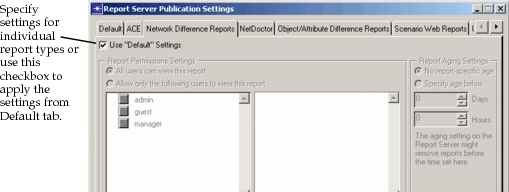
Each tab in the Report Server Publication Settings dialog box specifies settings for a specific report or for all reports.
- Default – Settings on this tab can be applied to other tabs, including roles, users, and aging settings.
- Report-specific – Specify settings for each type of report or apply Default tab settings to one or more report-specific tabs.
Figure 540: Report-Specific Tab Settings
Report Permissions Settings
You can allow all users to view this report type or set specific parameters for report security. To set specific parameters, select the “Allow only the following users to view this report” radio button. Then specify the users or user roles who can view the report. You can select a role if you want to include a group of users—for example, the admin group—and you can enter specific usernames that you may also want to include for viewing this report, if the users are not already included in the role. Using the buttons provided, you can also manage the available roles, add users, or delete users from the lists.
Key Concept—Specifying Report Permissions Settings in Modeler is not enough to ensure complete configuration. Users and roles must be configured in Report Server by the Report Server administrator or they will remain undefined and unable to view reports. For more information about user administration in Report Server, see the Report Server User Guide.
Figure 541: Change Available Roles
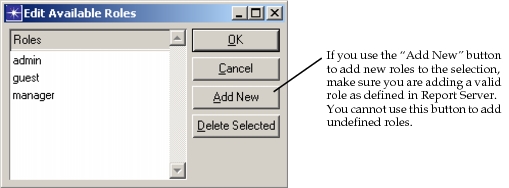
Note: If you add new roles through Report Server Publication Settings but do not add the roles and associate users with the role in Report Server, the role is undefined.
Report Aging Settings
You can set report-specific aging parameters. Choose the days and hours after which a report should be removed from the database. If the aging settings you specify here exceed what is configured in Report Server, the Report Server’s aging settings take precedence and your report-specific settings have no effect.