Objects and Attributes
Each object provides a list of attributes that offer control over various aspects of the object’s functionality. These attributes can originate from a variety of sources in Modeler. Many of the attributes of common objects are simply intrinsic to the object’s core definition. These are referred to as built-in attributes and are permanently associated with the object. All objects have some minimal set of built-in attributes that are considered fundamental for each type of object. The set of built-in attributes varies depending on the type of object, to allow configuration of appropriate functionality. For example, a node object always possesses attributes describing its position, and requires a “model” attribute to designate the model that specifies its characteristics. A state in a process model possesses only built-in attributes, including the enter and exit executives, and its status. Virtually all objects have a built-in attribute called “name” which serves as a unique identifier for the object within the model. For detailed information about the built-in attributes of each supported object, see “Modeling Reference”.
One particular attribute called “model” plays a special role. This attribute specifies a large part of an object’s characteristics. Among these characteristics are additional attributes may be acquired by an object when its model is designated. These additional attributes are defined within the model and relate to configurable functionality that is specific to the model. The functionality can be independently controlled for each model instance.
Finally, certain objects support the ability to append attributes to their attribute list. These are called extended attributes and are created one at a time for each object that requires them. Because each extended attribute must be defined and assigned separately for each object, this mechanism is generally much weaker than placing the attributes within models. However, there are some objects that do not support a “model” attribute, and in some cases, model developers may have a need to associate new data with those objects. Underlying models can generally not rely on the existence of these attributes because they are created manually. Therefore, the existence of an extended attribute is generally verified using the Kernel Procedure op_ima_obj_attr_exists() before it is used. If the attribute is present, then its value can be extracted and processed. In fact, in certain scenarios, the existence of the attribute is all that is of interest; the attribute in effect serves as a tag, designating a particular object as “special”. For example, subnetwork objects in the Network Domain do not have a “model” attribute. If for some reason, a particular subnet needs to be designated as special, an extended attribute called “special” could be manually added to the corresponding object; logic in underlying process or link models could check for the existence of “special” on each subnetwork object, and take appropriate action based on this information.
Figure 53: Aggregation of Attribute Sources into an Object Attribute List
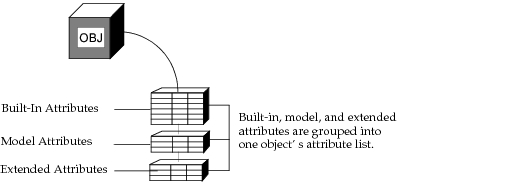
Key Concept—Each object maintains a list of attributes that provide external control of the object’s functions and behavior. Object attributes may come from different sources: they may be built-in to the object; they may be inherited from the object’s model; or they may be appended to the object as extended attributes.
Attribute Promotion
Earlier in this section, it was mentioned that models are one of the sources of attributes for objects. The attributes that a model makes available to its instances can originate from two separate sources. The first source, model attributes, represents an explicit definition of a newly created attribute that should be passed on to objects. The second source is referred to as object attribute promotion. Attribute promotion provides a mechanism for moving an attribute of an object at a lower level in the modeling hierarchy to the next higher level. The attribute is said to be promoted, and its value appears as shown in the following figure.
Figure 54: Presentation of Promoted Attributes
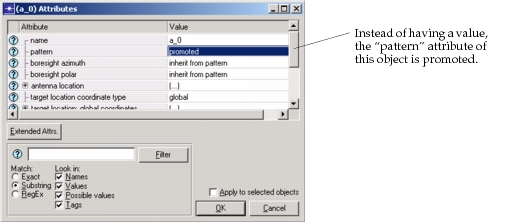
Promoted object attributes actually promote to the attribute interfaces of the encompassing model. Therefore, the promoted attributes of various objects may appear together in the model’s attributes. These attributes combined with those declared as model attributes form the model’s aggregate attribute interface.
Key Concept—An object attribute may be assigned a value to specify desired functionality. Alternatively, the assignment may be “deferred” so that it becomes an attribute of the encompassing model. The object attribute becomes part of the model’s attribute interfaces. The attribute is said to be promoted.
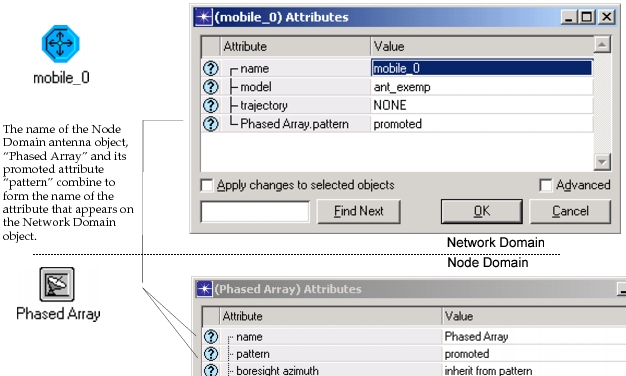
When a promoted object attribute is added to the model’s attribute interfaces, it is prefixed with the name of the object it belongs to. This ensures that no naming conflicts occur between attributes with the same name but belonging to different objects. The prefixing mechanism is illustrated in the following diagram, using an example from the Wireless functionality.
Figure 55: Prefixed Naming of Promoted Attributes
Promoted attributes may travel several levels through the model hierarchy. They simply continue to promote until they receive an assignment at one of the higher levels. Therefore, a promoted attribute of a module within a node model can promote through the node model’s interfaces and appear on a node object in the network level. If the node object provides no assignment for that attribute, then it will promote to successively encompassing subnet objects. The highest object in the model hierarchy is the “top subnet” which may also receive the attribute. In this case, the attribute is considered an attribute of the overall system model and can be set at simulation run time. This provides a convenient mechanism for iterating through a range of system parameter values in different simulations. Because the promoted attribute is a parameter of the system itself, there is no need to reenter and edit the model to specify its value. Automated suites of simulations can therefore be set up.
The following figure shows the concept of promotion to the boundary of the system model.
Figure 56: Promotion of an Attribute through the Hierarchy to the System Level
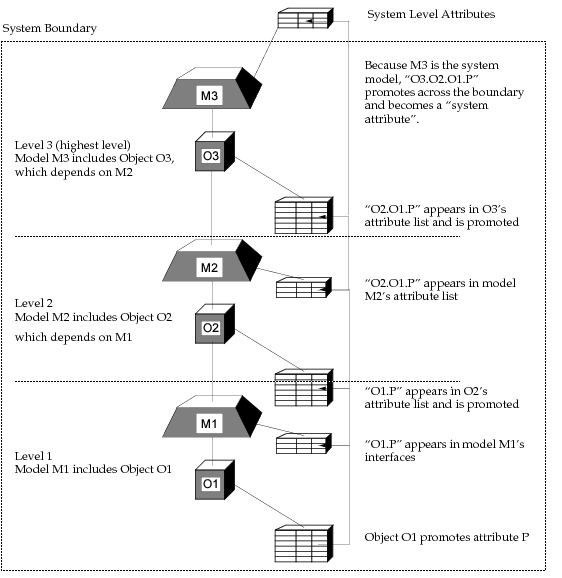
Key Concept—When an attribute is promoted, it travels “upwards” in the system model until it receives an assignment. If an attribute promotes through all levels of a model, it becomes an attribute of the overall system. Its value can then be set when running simulations, allowing you to evaluate the system for different values of the attribute, with no model changes.
In-Simulation Attribute Assignment
So far in this section, two mechanisms have been presented for assigning attributes. The first is to assign them during model specification. This is done via the Modeler editors or via other external interfaces provided by Modeler. Frequently default values are simply left in place, but this still is considered an assignment that is part of specification. A second mechanism is to defer assignment, specifying instead that an attribute be promoted to the top level of the system model. The attribute’s value is then specified at the start of the system’s simulation. In fact, one of these two mechanisms must be used for each attribute within a model because Modeler cannot allow the simulation to begin without every attribute having some definite value.
After a simulation begins, a third form of attribute assignment can be performed. This is dynamic attribute assignment which can be performed by processes running within the simulation.
By allowing object attributes to be updated as a simulation progresses, Modeler supports the development of advanced system models where components adapt their behavior and their definition based on relevant events and system conditions. For example, a queue module may reorganize storage limits on its subqueues to accommodate a higher rate of high-priority packets.
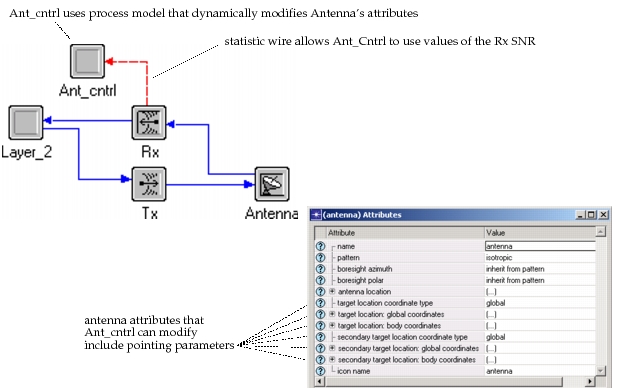
For this and all other dynamic modification of attributes, the intelligence to decide when an attribute should be changed must be provided by user-defined logic. Typically, these types of decisions are taken by a process model, but occasionally it may be more appropriate to include them in a link’s pipeline stage. The choice of where to locate the decision-making logic should be based on the availability of the information required to make a determination. For example, using Wireless functionality, the role of controlling an antenna to optimize the measured SNR may best be performed by a processor that is adjacent to the antenna and its receiver; this would allow convenient measurement of the SNR via a statistic wire. The following figure shows the arrangement.
Key Concept—Attributes can be set when specifying a model, before running a simulation, or dynamically during simulation. Dynamic attribute access provides important support for creating models of adaptive systems. In these systems, decision making components can control other components (or themselves) in response to changing conditions.
Figure 57: Node Subsystem Allowing Antenna Control Based on Receiver SNR
Certain attributes that are available during specification are not available during simulation, and vice-versa. In particular, attributes that control model display, such as icons and colors, are typically omitted during simulation. See the Modeling Reference manual for more information about the availability of attributes during simulation.
Processes use the Kernel Procedures op_ima_obj_attr_set() and op_ima_obj_attr_get() to set and get attribute values, respectively. The values that are assigned or extracted are represented as C data types which the model developer may have declared as variables or directly specified as constants, as shown in the following examples.
Figure 58: In-Simulation Attribute Assignment
/* Set the data rate of the channel to minimum value. */
op_ima_obj_attr_set (channel_objid, "data rate", 9600.0);

/* Compute the packet-holding capacity of the queue */
/* and assign half of it to each subqueue. */
pk_cap = max_timeout * (data_rate / AVG_PK_LEN) * 0.5;
op_ima_obj_attr_set (subq0_objid, "pk capacity", pk_cap);
op_ima_obj_attr_set (subq1_objid, "pk capacity", pk_cap);

/* Disable the regular interrupts for this processor. */
op_ima_obj_attr_set (proc_objid, "intrpt interval",
	OPC_BOOLDBL_DISABLED);
Modifying an attribute during simulation may trigger actions beyond the mere replacement of its value. Changes in attributes that specify behavior of objects may require that instant action be taken to maintain consistency of the object’s definition and the state of the system. For example, changing the capacity of a subqueue object in such a manner as to cause the current contents of the subqueue to exceed the new limitation requires that part of the subqueue be drained. Another common case involves the in-simulation modification of a processor’s “intrpt interval” attribute, which requires that a new event be scheduled, or that a pending event be canceled, depending on the new assignment. See the attribute-specific documentation in “Network Reference” on page 60 and “Node Reference” on page 8 for more information about the actions triggered by changes in each attribute.
Restrictions on Modifying Attributes
The properties of attributes may be defined to do checks on values that are assigned to them. These checks are designed to prevent inconsistent or nonsensical values from being inserted, and eventually used during simulation. For example, the data rate attribute of a transmitter channel should never be negative or zero, because this would it make it impossible to compute meaningful packet transmission times.
Each attribute defines its own validity criteria, as documented in “Network Reference” on page 60, “Node Reference” on page 8, and “Process Reference” on page 1. During specification, an attempt to assign an unacceptable value will simply cause an error message to be displayed and the assignment will not take hold. An improper assignment will generate a nonfatal error, and op_ima_obj_attr_set() will return an appropriate completion code.
While some attributes allow themselves to be modified only according to certain rules, others allow no modifications whatsoever. Typically, attributes relating to identification, or key structural attributes such as the “model” attribute of a node, do not allow their value to be changed during simulation. However, these attributes may be modified freely during specification. The “write permissions” property of each attribute may vary between specification and simulation activities; see “Modeling Reference” for more information about each particular object attribute’s write permissions.
Key Concept—Dynamic access during simulation is possible only for certain attributes, and must respect the properties of the attribute. Access is provided by official program interfaces called kernel procedures, or KPs. These ensure that only authorized operations are performed on the attributes.