Attributes
When representing an object, certain characteristics of the object are considered “private” and remain hidden within the object. Other characteristics are considered useful to expose to the user of the object, for various reasons. These characteristics are represented in the form of data items called attributes. Attributes are useful for two primary purposes: to inform users about selected characteristics of an object; and to allow these characteristics to be modified for specific applications. The type of information that can be specified with attributes is quite general. It includes general characteristics, object behavior, and internal structure.
Attributes can be associated with classes of objects, as well as with particular objects. In other words, an attribute can be defined for a model. This topic is described in Model Attributes. For the purposes of this section, the term attribute is used generically to refer to both object attributes and model attributes.
Key Concept—Attributes store data that describes an object or model. They can be used to: provide information; specify general characteristics; select behavior; modify internal structure.
Each attribute provides storage for information that constitutes part of the specification of an object or a model. The contents of the attribute are referred to as its value. An object or model may of course have many attributes. Therefore, to gain access to the value, either to read (examine), or write (modify) it, the attribute must be identified uniquely. This is accomplished by designating a name for the attribute. No two attributes on the same object, or on the same model, may have the same name.
Key Concept—All attributes have a name and a value. The name is unique within the “context” that the attribute belongs to (such as object or model). It is used to refer to the attribute when reading or writing its value.
Attribute Data Types
Attributes can store different types of information to support specification of a broad range of object and model characteristics. Most attributes have a “simple” value, meaning that they consist of just one element. These include familiar types such as numbers, text strings, and booleans. Even text strings containing multiple characters, words, and lines, are considered simple values because they do not encompass storage for any additional attributes. Support is also provided for a compound attribute which encompasses nested objects. These nested objects may have their own attributes, which in turn may be simple or compound. Therefore the information stored within an attribute may have a “flat” structure in the case of a simple attribute, or a hierarchical structure in the case of a compound attribute. The following table lists the attribute types that may be found within a model, provides an example of each, and indicates which datatype can be used in programs to hold the attributes’ values.
Table 26: Supported Object Attribute Types
| Attribute Type | Example Attribute | C Language or Riverbed-provided Datatype |
|---|---|---|
| Integer | “priority” of a processor | int |
| Double | “data rate” of a channel | double |
| Compound | “channel” of a transmitter | Objid |
| Toggle | “begsim intrpt” of a processor | int |
| Toggle Double | “intrpt interval” of a processor | double |
| String | “name” of a fixed node | char [] |
| String List | “interarrival args” of a processor | char [] |
| Typed File | “process model” of a processor | char [] |
| Icon | “icon name” of a mobile node object | char [] |
| Enumerated | “failure intrpts” of a processor | int / char [] (see below) |
| Color | “color” of a simplex point-to-point link | int |
| Textlist | “enter executives” of a state | List |
The following list describes the various attribute types.
-
Integer – positive or negative whole numbers with magnitude less than 2³¹ – 64. These attributes typically represent small numerical values such as counts, identifiers, connection indices, or priorities. Certain integer values beyond the allowed range are constants with special meanings: OPC_INT_UNDEF represents an undefined value resulting from a computation that cannot be performed or insufficient information; OPC_INT_INVALID represents an invalid value, typically indicating an error condition. OPC_INT_INFINITY represents an unbounded integer value.
-
Double – positive or negative double-precision floating point numbers with a magnitude less than 10¹⁰⁰. These attributes typically represent precise numerical quantities (for example, the propagation delay of a link), or whole numbers with potentially very large values (such as the data rate of a channel). Several constants that are outside the allowed range may be used to indicate special values of this type of attribute: OPC_DBL_UNDEF represents an undefined value resulting from a computation that cannot be performed or insufficient information; OPC_DBL_INVALID represents an invalid value, typically indicating an error condition. OPC_DBL_INFINITY represents an unbounded double value.
-
Compound – supports complex data storage consisting of a set of objects. The actual value of a compound attribute is a special object which provides access to two items: a “count” of underlying “subordinate” objects; and an array of subordinate objects. The subordinate objects can have multiple attributes, including additional compound attributes, allowing further nesting of complex data. Compound attributes are often used to represent data that is stored in tabular format. Every row of the table can be though of as an additional subordinate object, and the column headings of the table correspond to the attributes of the subordinate objects.
-
Toggle – bi-valued attribute capable of representing a “true” or “false” state. During specification, these values usually appear as “enabled” or “disabled”, though certain bi-valued attributes can use specific names for these two values; during simulation they correspond to the constants OPC_TRUE and OPC_FALSE, respectively. Toggle attributes are used to represent properties of an object that can only have two possible settings, typically some sort of status of the object. Examples include the condition attribute of a node (its operational status), or the endsim intrpt attribute of a processor (selects whether the Kernel delivers a special interrupt to the processor when the simulation completes).
-
Toggle Double – may represent the same range of values as the above-described double attribute when placed in the enabled state. The disabled state indicates that the attribute’s value should not be considered. Therefore a toggle double attribute’s value may appear either as “disabled” or as a number; the value “enabled” never appears. The special constant values that apply for ordinary double attributes also apply and have the same meanings for toggle double attributes. In addition, the constant OPC_BOOLDBL_DISABLED is used to represent the disabled state. Toggle double attributes are used to specify optional characteristics of an object, and they have a numerical form when they are selected.
-
String – a series of characters used to hold one line of text. Typical examples include names, logic statements, or the name of an object or other general property.
-
String List – also a series of characters holding one line of text, string list attributes are intended to contain multiple textual elements which together form a value. The elements can be separated by commas, tabs, or spaces within the string. A typical use of this type of attribute is for the argument list (for example, the “interarrival args” of a processor) of a probability distribution, where both mean and variance may be specified.
-
Typed File – character string representing a file that is part of Modeler’s system of managed files. Typed file attributes refer to a specific type of file corresponding to a suffix at the end of the file name. The typed file data type provides two services:
- Automatic path name construction allows the user to simply specify a file name and Modeler can determine the actual location of the file in the filesystem.
- When prompting for an assignment for a typed file attribute, Modeler constructs a list of those files that are available.
Examples of attributes of this data type: a mobile node’s trajectory, a satellite’s orbit, a processor’s process model, and a node’s node mode.
-
Icon – character string representing an icon from one of the active icon databases. Selected icon databases are loaded when Modeler is executed, and the set of icon names that can be chosen from for these attributes is the union of all the icon names included therein. Icon attributes are used only to control graphical representation of an object, and are not present during simulation.
-
Enumerated – these attributes appear as character strings during specification, and as integers during simulation. In both contexts, a finite, and usually small set of values can be assigned to them. In this sense they may be thought of as a generalization of toggle attributes. The string representation is provided for specification because it is generally more informative; during simulation, integers are a more efficient and useful datatype to manipulate. Examples of this data type include the “src stream” and “dest stream” attribute of packet streams, and a processor’s “failure intrpts” attribute.
-
Color – some objects allow the user to control the color used to draw them. For example, satellite orbits and point-to-point links each can be assigned a color from a color palette. Like icon attributes, color attributes are strictly used while specifying models, and play no role during simulation.
-
Textlist – these attributes store a list of character strings to represent general textual information. Typical applications are sections of user-defined code, or documentation.
Key Concept—Attributes can store diverse types of data, depending on their purpose. Data types include several forms of logical, numerical, and text storage, as well as a special type called compound that holds nested objects.
Attribute Properties
Though they appear to be relatively simple on the surface, attributes can be complex entities. While an attribute is identified by a name, and its function is to store a value, the way in which the attribute behaves is described by a third component, called the attribute’s properties. In broad terms, attribute properties specify: the type of data an attribute can store; how it can be manipulated; how it is presented to the user; and the function it performs. The following table lists each component of attribute properties:
Table 27: Attribute Properties
| Property | Description |
|---|---|
| Data Type | Specifies the type of information that the attribute can store. This property is sometimes referred to simply as the attribute’s “type”. |
| Default Value | The value that may be used by the system when an assignment is required, but none has been provided by the user. Also used to “suggest” a value to a user when prompting for an assignment. |
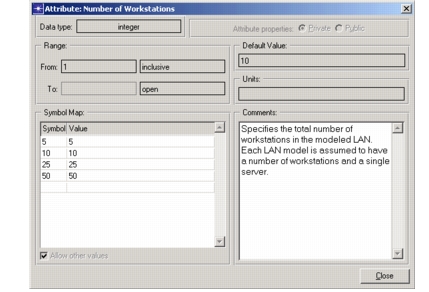
| Auto .Assign value | When this checkbox is selected, it allows the default value to be used when no value is specified at run-time. Additionally, if a property change causes a previously-set value to become invalid, that value is removed and either promoted or replaced with its default value, if this checkbox is selected. |
| Units | Additional information that can assist users in entering certain numerical attribute values. For example for a “distance” attribute, units are needed for a user to know if values should be given in meters, kilometers, miles, etc. Many attributes simply leave this property blank. |
| Range | A numerical interval that may restrict the set of values that an attribute can store. The interval consists of a lower and an upper bound, each of which may have a value or be open. An open bound means that the interval is open-ended toward negative or positive infinity. A bound’s value may be specified if the bound is exclusive or inclusive. An inclusive bound means that the bound value itself is allowed, whereas an exclusive bound means that all values within the bound are allowed, but not the bound itself. |
| Symbol Map | A collection of user-defined symbolic names associated with specific attribute values. Symbol maps are used to suggest reasonable values for an attribute and in some cases also to restrict the allowable values to a discrete set. The symbol map includes an allow other values component, which dictates whether values other than those enumerated in the symbol map can be held by the attribute. |
| Attribute Description | Indicates whether the attribute’s properties are public or private. If the attribute description is private, then the property specifications belong specifically to a particular attribute definition. If the attribute description is public, then the properties specifications can be shared with other attribute definitions in the same or other models. Public attribute descriptions provide a means of defining re-usable attribute “classes” and managing them in a centralized manner. |
| Comments | Documentation that may provide any relevant information about the attribute, as a model designer sees fit. Typically these include a description of the attribute’s meaning, and instructions on how to use it. |
Key Concept—An attribute’s data type is just one of its properties. Attribute properties specify information about how an attribute can be used, how it behaves, and how it is presented.
As mentioned, symbol maps allow a pre-defined word or phrase to represent an underlying value for an attribute. The word or phrase is referred to as the symbol, and can contain any general sequence of characters. However, there are a few symbols that are reserved for numerical attributes. These symbols represent special values supported by Modeler, and are therefore not permitted as user-defined symbols. In addition, there are restricted forms that symbols are not allowed to match. These restrictions are listed in the following table.
Table 28: Restrictions on Attribute Symbols
| Restricted Form or Symbol | Details |
|---|---|
| zero length | Symbols must contain at least one character. |
| “Other” | Reserved word. Used as a choice when “Allow Others” option is enabled. |
| “(...)” | Reserved word. Used to represent a compound attribute’s value. |
| “promoted” | Reserved word. Used to represent the value of a promoted attribute. |
| contains “ | Symbols cannot contain the double quote character (“). |
| contains “|” | Symbols cannot contain the vertical bar character (“|”). |
<num> TO <num> |
Symbols may not contain this form, which is reserved to represent a range of values. |
Viewing Attribute Properties
You can view or change attribute properties in the Attribute Properties dialog box. Because you can change properties only at certain times, however, there are two versions of this dialog box. A read-only version restricts you to viewing the attribute properties, whereas the standard version allows both viewing and editing. For viewing attribute properties, this dialog box can be accessed several ways:
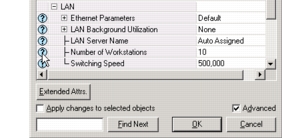
- Via the Help icon (?) in the Attributes dialog box when the Advanced checkbox is checked
- Via the Details button in the Attributes dialog box.
- Via the Details button in the Rename/Merge Attributes dialog box.
- Via the Edit Properties button in the Extended Attributes dialog box.
- Via the Edit Properties button in the Derive New Model dialog box.
The following procedure describes how to access the Attribute Properties dialog box using the Details button.
Procedure 1: Viewing Attribute Properties
- Open an Attributes dialog box or a Rename/Merge Attributes dialog box. This procedure uses an Attributes dialog box.
- Check the Advanced checkbox.
- Click the Help icon (?) next to an attribute name.
The read-only version of the Attribute Properties dialog box pops up, displaying detailed information about the attribute.
Public Attribute Descriptions
In many applications, attributes are defined which may appear on a variety of different objects and models. An attribute such as “data rate” may have a consistent definition for transmitter channels, receiver channels, and for links. It is of course possible to specify the attribute’s definition for each type of object or model that requires it. However, this approach has the disadvantage of being redundant and therefore requiring more work. Even more importantly, separate and redundant specifications require significantly more work to maintain as changes become necessary, and allow inconsistencies to develop between the definitions.
A much safer and more economical approach is to maintain a centralized definition of the attribute. Modeler supports this approach with a feature called Public Attribute Properties. Public attribute properties are normal attribute properties specifications that can be referred to by an attribute. By maintaining only references to the properties, rather than the actual specifications, multiple attributes automatically track any changes to the properties.
Figure 46: Sharing of Public Attribute Descriptions
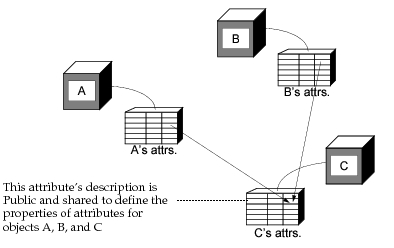
Figure 47: Making Attribute Properties Public
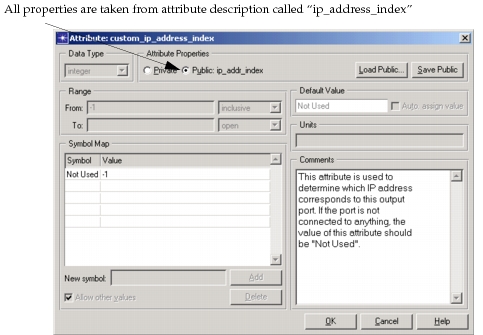
Key Concept—An attribute’s properties can be private or public. A private attribute property description is applicable only to the attribute that it is associated with. A public attribute property description is shared by many attributes, potentially in different objects and different models. Changing the public attribute properties affects all of the dependent attributes.
Compound Attributes
Modeler supports both simple and compound attributes. Simple attributes contain data with a flat structure, whereas compound attributes contain hierarchical data. The hierarchy of data is composed of objects. In fact, each compound attribute can contain an array of one or more objects, as specified by the compound attribute’s count attribute.
Each contained object has its own set of attributes. The attributes of the nested objects are full-featured, including a name, value, and properties. They can themselves be compound, allowing unlimited nesting of objects embedded via compound attributes.
Key Concept—The purpose of a compound attribute (CA) is to provide complex data in an object or model interface. CAs can be nested arbitrarily deep. A CAs properties define the objects that it will store. Each attribute of the nested objects is defined as a full attribute with a name, and properties. A “count” of nested objects is specified.
Some examples of compound attributes are provided by the built-in (pre-defined) attributes of certain objects. For example, each queue object (used in the Node Domain) can contain one or more subqueues, which are themselves objects. The entire configuration of subqueues is modeled as one compound attribute of the queue. By specifying the count for the “subqueue” attribute, the user can specify that any number of subqueues be instantiated within the queue object. Similarly, channels for transmitter and receiver objects are represented as compound attributes. User defined attributes for objects and models may be compound as well, and their attributes can be completely general. Typically, compound attributes are used to represent data that has the form of a table (such as a routing table) or a list of virtual circuits. In these examples, each route or circuit can be considered an object.
Key Concept—Modeler uses compound attributes (CAs) for some of its built-in object attributes. These include the subqueue attribute of queue objects, and the channel attribute of transmitter and receiver objects.
Like all attributes, compound attributes have one value. The value of a compound attribute is a special object known as a compound attribute object. The compound attribute object (CA-object) has no attributes but serves merely as a placeholder to group a set of subordinate objects together. During specification (that is, in the Modeler editors), the CA-object is represented as shown in the following figure.
Figure 48: Presentation of Compound Attributes Values

During simulation, each CA-object has an object ID. This object ID can be used to access the subordinate objects. The CA-object is considered to be the parent of the subordinate objects and these can be accessed using the Kernel Procedure op_topo_child(). (See Object Hierarchy for more information about parent-child relationships.) Similarly, op_topo_parent() can be used to determine the object ID of the CA-object given knowledge of one of the subordinate objects. For more information about these Kernel Procedures, see Chapter 18 “Topology Package” on page 1239.
In the case of built-in compound attributes, the subordinate objects have a specific type: for the “subqueue” compound attribute of a queue, the subordinate object is the pre-defined object called “subqueue”. Similarly, the “channel” attribute for a point-to-point transmitter contains point-to-point transmitter channel objects. Each transmitter and receiver channel compound attribute contains its own specific type of subordinate object. However, for user-defined compound attributes, a generic object type is defined. Generic objects have no built-in attributes, but are entirely determined by the attribute definitions that users provide. Like subqueues and other subordinate objects, generic objects are considered to be the children of compound attribute objects. Figure 49 shows the relationships between objects, compound attributes, CA-objects, and generic or subordinate objects.
Figure 49: Compound Attribute Structure
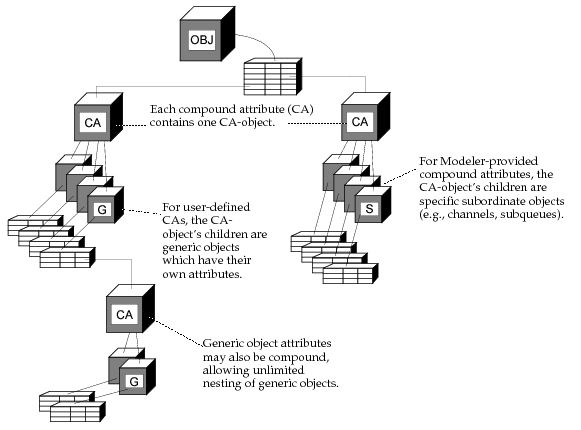
Key Concept—A compound attribute’s (CAs) value is a special object called “compound attribute object” (CA-object). The CA-object acts as a “concentrator” for all of the subordinate objects. The subordinate objects are considered to be children of the CA-object.
When defining compound attributes in the “Process Editor” (Interfaces > Model Attributes), you can edit the properties of the selected attribute by clicking the Edit Properties button, as shown in the following figure.
Figure 50: Defining Compound Attributes in the Model Attributes Dialog Box
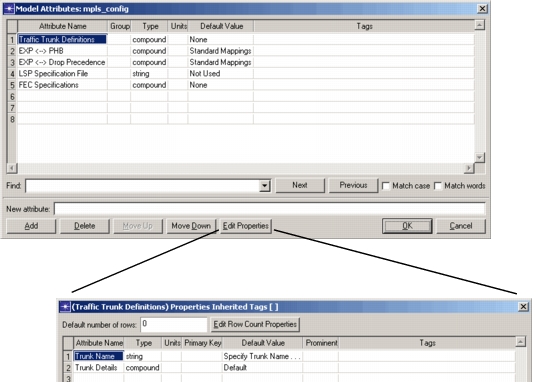
In the Properties dialog box, note the following columns:
-
Primary Key – Designates the corresponding attribute as the primary key. The name of primary key attribute displays in the rows column of the Compound Attribute dialog box. Having the attribute name display in the rows columns makes the Compound Attribute dialog box easier to understand.
-
Prominent – For members of a compound attribute, includes the attribute in filtered search results when an associated attribute (belonging to the same compound attribute row) matches the specified filter criteria.
-
Tags – Specifies keywords that identify the attribute within the Edit Attributes dialog box. Separate multiple tags with spaces. Tags containing spaces must be placed within double quotes.
Keywords are defined using the following syntax:
<string>– Used to associate text with the attribute. When filter criteria matches the text, the correspond attribute is included in the filter results. Use this syntax to specify an interface type, a vendor name, or a CLI command.$– Used to include the attribute’s value in a filtered search as a keyword.$<attribute>– For a member of a compound attribute, used to indicate the attribute containing the tag should always be included in the results when the filter criteria matches the indicated attribute. For example, enter the tag “$Name” to include the tagged attribute with the filtered results when the search criteria matches the value of the “Name” attribute.$$<attribute>– For a compound attribute, used to indicate that the entire row be included in the results when the filter criteria matches the value of the indicated child attribute.~<value>– Used to exclude an attribute that matches filter criteria. For example, enter “~Juniper” to exclude the attribute from a filter search with the filter criteria of “Juniper”.
Keyword filtering in the Edit Attributes dialog box is further defined by the "obj_dbox_default_keywords" preference, which specifies the default filter results. (The default filter is active, even if you add your own criteria.)
When defining default filtering results, use the following syntax:
-
<string>,<associated_text>– Used to associated text with filter criteria. -
^<string>– Used exclusively with one of the strings entered for the preference. Additionally, it indicates for that attribute and any child attributes that the text associated with that string from the preference must be found for it to be a match.For example, consider the following:
- For obj_dbox_default_keywords preference, assume the following is entered: “Vendor, selfdesc:’Vendor’
- You’re examining a device whose self description Vendor field is “Cisco Systems”. Therefore, note that the associated text is “Cisco Systems”.
- An attribute tagged with ^Vendor “Cisco Systems” will be included in the default filter display.
- An attribute tagged with ^Vendor “Juniper” will not be included in the default filter display.