Traffic Options for Import from NetCollector
Using the Traffic tab, you can import available traffic data collected by NetCollector to add to the imported network in NetPlanner.
Import Traffic Options
Traffic that is available from the NetCollector, such as link loads or flows, is configurable in the Traffic tab and will be configurable. Specify traffic-related import options as follows:
- Include? – Click on the value in this column to enable or disable the inclusion of the available traffic data.
- Traffic type – Displays the available traffic type you can configure in this row.
- Traffic information – Displays the available traffic information gathered from the NetCollector.
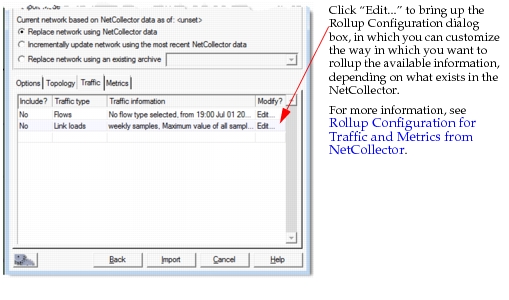
- Modify? – Click on “Edit…” in this field to open the Edit dialog box, shown in Figure 8.
Figure 8: Import from NetCollector—Traffic Tab—Flows
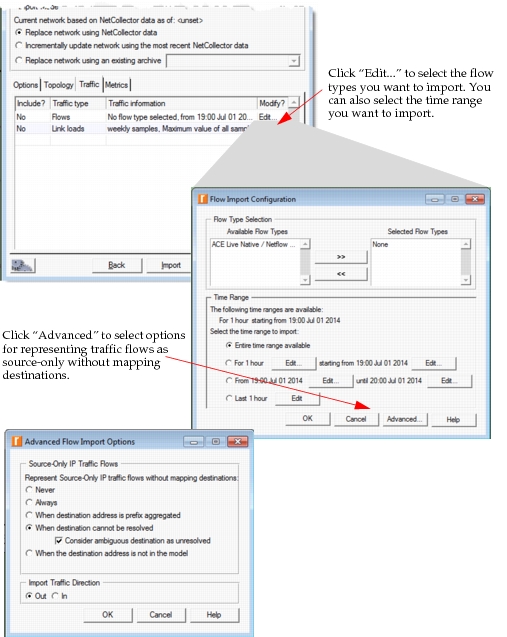
Key Concept—“Source-Only” traffic flows model traffic in the same way as flows mapped with source and destination nodes in the network model. The difference is that one of the endpoints is not mapped to a specific node. Instead, the traffic flows to a dynamic IP address endpoint that can change from one imported scenario to the next.
Figure 9: Import from NetCollector—Traffic Tab—Link Loads
Interface Load Traffic Import
In most cases, network traffic collected by NetCollector or a third-party traffic collection tool includes interface load traffic data from all interfaces available on a per-device basis. Your traffic analysis might require all or part of this collected traffic in NetPlanner.
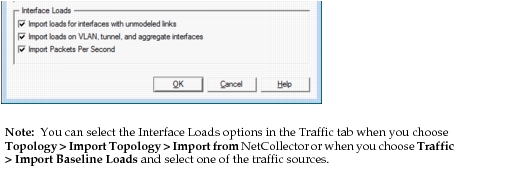
You can import interface load traffic based on the following options, as shown in the figure below.
- Import loads for interfaces with unmodeled links
- Import loads on VLAN, tunnel, and aggregate interfaces
- Import Packets Per Second
Figure 10: Interface Load Import Options