Accessing Import from NetCollector
To import from NetCollector, you can choose Topology > Import Topology > From NetCollector. You may also go directly to Import from NetCollector during the creation of a new project. See Import from NetCollector—Procedure for more information.
When importing from NetCollector, the following dialog box appears. Note that if your NetCollector is configured for two-factor authentication, additional steps are needed for logging in. See Authenticating to NetCollector.
Figure 1: NetCollector Import Dialog Box
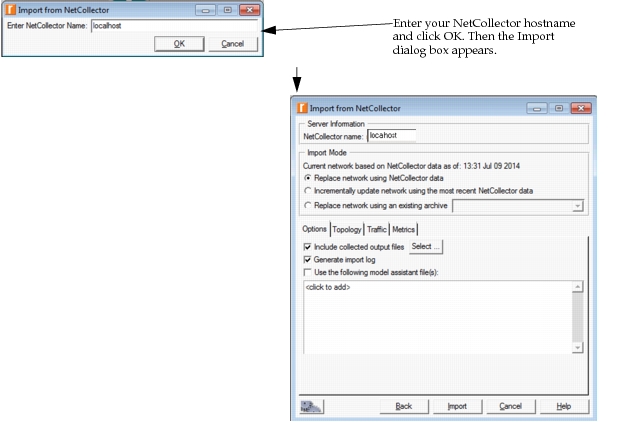
To import the data from NetCollector, you must specify the following information:
- NetCollector Name – Specify the hostname or IP address and port for the NetCollector.
- If you are running import on the same machine as the NetCollector, use “localhost” as the server name.
- If the NetCollector is in the same domain in which you are running import, enter the hostname without domain extension or enter the IP address of the NetCollector.
- If the NetCollector is in a different domain, enter the server name as
hostname.domain, i.e. vneserver.opnet.com, or enter the IP address of the NetCollector. - The default port number is 900. If you are importing from a NetCollector installed on Linux, change the port number to 3001. If you are importing from NetCollector on any port other than 900, enter the server name as
hostname:port(orhostname.domain:port) or IP address and port (i.e.,ip_address:port).
Note: You can also change the default port used during import by setting the NetCollector Port preference to the desired port number.