Simulation Console (ODB)
When you run a simulation with ODB, an interactive version of the Simulation Console is available in the Simulation Execution Dialog Box (Advanced). To view the Simulation Console, click the Console tab in the control pane or press Ctrl+Shift+C. This version of the console lets you enter ODB commands and control execution of the simulation.
Figure 2: Simulation Console for ODB
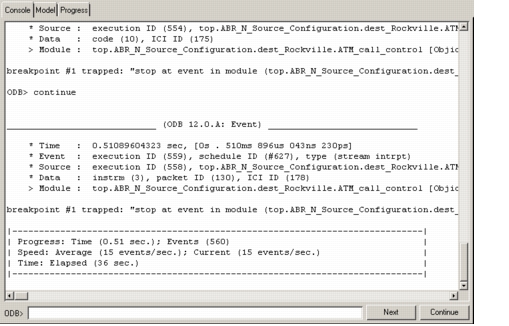
Table 2 lists the controls in the ODB Simulation Console.
Table 2: Simulation Console (ODB) Controls
| Control | Description |
|---|---|
| Console display | Displays status, simulation progress, and error messages generated by the simulation program, as well as all ODB commands that you enter and the responses to them. |
| ODB> (command line) | Used to enter ODB commands. When the cursor is in the command line: • The up-arrow and down-arrow keys scroll through a list of previously issued commands. • Typing some text brings up the most recent command that begins with that text. The portion not typed is highlighted and will be replaced by any additional typing. Use right-arrow to go to the end of the text. Backspace deletes the last character typed and a new match is not shown until another character is typed. • The Tab key (when the command line contains some text) cycles through matching commands in the list of previous commands, if any. When there is no text in the command line, the Tab key moves the focus to another control. Thus, you can enter a command, press Return to process the command processed and clear the field, then press Tab to go to the next or some other control. |
| Next button | Steps the simulation through the next (pending) simulation event. Same as entering the ODB next command. |
| Continue/Break button | Toggles between Continue and Break to control simulation execution. • Break – Pauses the simulation at the end of the currently executing simulation event. • Continue – Resumes execution of the simulation. Same as entering the ODB continue command. |
For a description of the basic Simulation Console, see “Simulation Console” on page 418.