Network Time: Calendar, Relative, and Network Start Times
Modeler can model many types of data that vary over time, such as:
- Link loads or utilizations
- Traffic levels between two nodes
- Simulation results that vary over time (for example, TCP window size)
- The locations of mobile nodes in wireless scenarios
Modeler can measure and represent data using calendar times (for example, “Jan 14 19:40:30 2002”) or relative times, which are offsets from a start time (for example, “30 seconds”).
A scenario can have a network start time associated with it. The network start time is an calendar time value (that is, an absolute date and time) that defines the start of the time window for which the scenario analyses the network. For example, when you run a discrete event simulation, Modeler
- treats all relative time values as offsets from the network start time.
- ignores any time-based data outside the simulation time window, which starts at
<network_start_time>and ends at<network_start_time>+<simulation_duration>.
You can view the changes in time-varying data using the Time Controller (View > Show Time Controller). You can also use the Time Controller to set the network start time manually. For more information, see “Show Time Controller”.
Note: Unless indicated otherwise in the user interface, all calendar times are shown in local time.
Calendar, Absolute, and Network Start Times: An Example
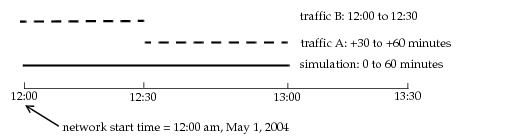
In general, the network start time is undefined unless the scenario contains data based on calendar times. Suppose you create a network scenario by importing device configuration files; then you specify traffic (using relative time values) from 30 to 60 minutes; then you run a discrete event simulation with a duration of one hour. Because all the time data (so far) is relative, the network start time is undefined.
Figure 203: Network Time Example, Step 1: No Start Time Defined

Suppose you import 30 minutes of traffic data that starts at May 1, 2004, at 12:00 pm. Because this is the first calendar time data to be introduced into the scenario, Modeler uses this to set the network start time. A simulation of one hour considers both the old and the new traffic, and simulates the time window from 12:00 pm to 1:00 pm on May 1, 2004.
Figure 204: Network Time Example, Step 2: Start Time Set
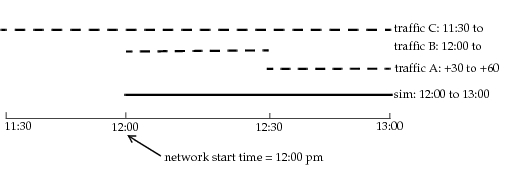
Now, suppose you import traffic from 11:30 am to 1:00 pm—that is, traffic that starts 30 minutes before the network start time. If you do not change the start time, the traffic from 11:30 to 12:00 will be ignored.
Figure 205: Network Time Example, Step 3a: Same Start Time
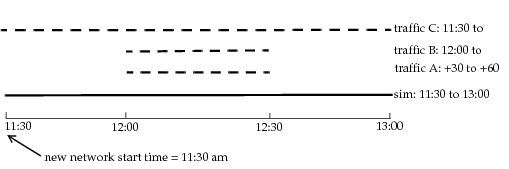
For a simulation to consider all existing traffic, you need to reset the network start time and run a longer simulation. Note the effect of changing the start time on traffic A: because this traffic is defined using relative times (30 to 60 minutes after the start time), the time window for this traffic has shifted back 30 minutes.
Figure 206: Network Time Example, Step 3b: New Start Time