Statistic Promotion
The issue of customization and control described in the previous section exists not only for attributes of a node model, but for statistics as well. This section describes the node developer’s mechanisms that allow control of the statistics that are available to node model users.
Most modules at the node level offer a set of built-in statistics. There are statistics that are computed automatically and made available by the Simulation Kernel. In addition, process models can declare and compute application-specific statistics that appear as local output statistics of their encompassing queue and processor modules. These sources of statistics combine into one list of statistics that a node model is capable of reporting.
In general, not all of the statistics of a node model are of interest to its users. Many built-in statistics of modules are not relevant or interesting for particular applications. In addition, process models may compute specialized statistics that are useful only in very particular situations. To avoid overwhelming the node model user with the complexity of a large statistic set, the node model developer requires the ability to eliminate those statistics that he considers unimportant. In fact, because the majority of a node’s statistics are typically not wanted, Modeler by default assumes that each statistic should be prevented from appearing in the node model’s interface. Explicit designation of the desired statistics is then required and Modeler provides this capability with a mechanism called statistic promotion. Statistic promotion is simply an indication to Modeler that a model should make a particular statistic available to its users. Promoted statistics then become available to be assigned to node statistic probes for data collection during simulation. For more information about node statistic probes, see Chapter 10 “Simulation Design” on page 375.
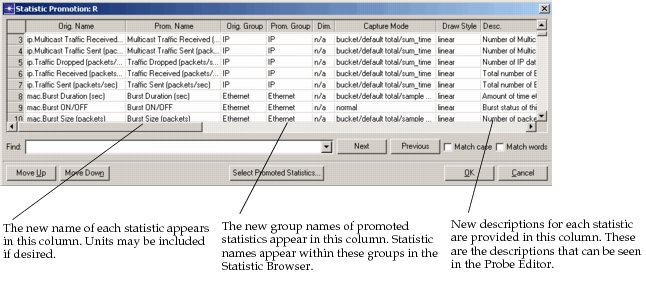
For each statistic that is promoted, the node model developer has the opportunity to make three changes to its presentation. First, the name of the statistics can be changed to be more meaningful for particular applications. In particular, by default, each statistic name is prefixed with the name of the module that generates it. This is necessary to distinguish between identically named statistics associated with different modules. However, the module names can confuse node model users, especially users of other Riverbed analysis software products who are unaware of the internal architecture of the node. For this reason, in almost all cases, some adjustments to the statistic name are specified when the statistic is promoted.
The second change that can be made is to the statistic’s group. Promoting statistic groups allows the node model developer to organize statistics into logical groups, defined by the developer. This makes it easier for users to find and view statistics when they select Choose Results in the Project Editor. Arranging statistics in groups also enables the model developer to reuse descriptive names (such as “Throughput (bits/sec)”) for similar statistics in different contexts.
The third change that can be made is to replace the descriptive comments associated with the statistic. These comments serve as documentation for the statistic and can be customized to be appropriate for the anticipated end user.
Node statistic promotion is performed using the Promote Node Statistics operation of the Node Editor. The following figure shows the dialog box that supports statistic promotion.
Figure 174: Specialization of Model R to Generate Derived Model R’