Node Model Attributes
A developer can create any number of new attributes and associate them with a node model. These node model attributes belong to no particular object in the Node Domain, but to the model as a whole. When the node model is instantiated as a node object in the Project Editor, these attributes are inherited by the node object. Each separate instance of the model inherits its own private “copies” of the attributes. Node model attributes therefore provide a way of augmenting the set of attributes supported by a class of node objects.
Node model attributes are generally used to provide additional means of control to node model users. By exposing a characteristic of a node model and allowing it to be modified externally (i.e., on a per-instance basis), the node model gains generality and can be more broadly re-used in different modeling situations, a principle that is described in “Modeling Framework” on page 80. The same approach is supported by process model attributes, which allow new attributes to be introduced for modules in the Node Domain.
This raises the question of when to employ node model attributes versus process model attributes. In general, the answer is dependent on the “scope” of the attribute. In other words, the question is: does the attribute rightfully belong to a particular object in the node or does it belong to many objects in the node, or even to the node as a whole? For example, an attribute specifying the velocity of the node object is truly an attribute of the node rather than any particular object in the node. In contrast, the processing speed of a packet-switch’s switching element is probably a characteristic of the processor or queue that represents the switching element, rather than a characteristic of the node as a whole. Of course, the processing speed is still part of the description of the node as a whole because the node encompasses the switching element. However, it is more closely associated with the processor and belongs to the node only by incorporation.
Another useful question that is more concrete and easier to answer is: which objects actually use the attribute during simulation? If the answer includes only one object, say a processor module, then in general it makes more sense to declare that attribute in the process model that is associated with that processor. If, on the other hand, many objects in the node model require access to the attribute, then the model developer may consider defining the attribute as part of the node model. Because model attributes are user-defined, they must in all cases be interpreted by user-defined logic embedded within process models, or in some rarer cases transceiver pipeline stages. Therefore, there is usually at least one process model that must have prior knowledge of the existence of a model attribute, regardless of which level it is declared in. For this reason, there is a natural bias toward declaring model attributes at the process level rather than the node level.
Another way to understand this bias is to realize that, if a model attribute is declared at the node level and a process model expects to refer to that attribute, then problems can occur if the process model is used within a different node model which does not declare the required attribute. This usually means that process models need to verify the existence of a node model attribute by using the KP op_ima_obj_attr_exists() prior to accessing the attribute on the node object. For these reasons, model developers generally tend to use process model attributes for most applications
Figure 171: Node Model Attribute Declaration
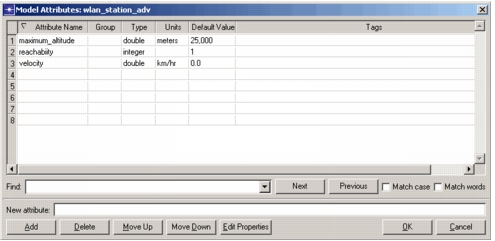
Node model attributes are declared using the Node Editor, which supports attributes of several different data types, including compound attributes. The properties of each attribute can also be defined to control the attribute’s behavior when it appears in the Project Editor. See “Modeling Framework” on page 80 for information about attribute data types and properties. See “Model Attributes” on page 460 for details on how to declare and edit model attributes.