Node Attribute Interfaces and Derived Node Models
The previous section described how model attributes provide the capability to create new attributes for a node model. This section describes how node model developers can use a separate mechanism called model attribute interfaces to exercise control over existing attributes, as well as to specify a variety of aspects of a node model’s interface presented to the model user.
For more conceptual information, see “Modeling Framework” on page 80.
Attribute Interface Descriptions
The primary capability of attribute interfaces is to support modification of attributes that promote from objects within the node model. Attributes that are declared in the node model attributes are not dealt with in the attribute interfaces, because the model developer has full control over those at the definition stage. Object-promoted attributes can either be built-in attributes of modules and connections, or process model attributes that have been appended to the attribute lists of processors and queues. Using the attribute interface descriptions component of the attribute interfaces, the node model developer can apply the following types of changes to the attributes that the node model offers:
Table 89: Control provided by Node Attribute Interface Descriptions
| Mechanism¹ | Description |
|---|---|
| Attribute Renaming | Provide a new name for an attribute as it is appears from the node model user’s point of view. This is the name of the attribute as it is seen on a node object in the Project Editor. |
| Attribute Merging | Replace a set of attributes with one new attribute. The underlying attributes are tied together in the sense that changes to the new attribute are propagated to each of them. |
| Attribute Properties Changes | Certain attribute properties, including range, symbol map, comments, and default value can be altered. |
| Attribute Status Changes | An attribute can be given one of three status values: promoted, set, or hidden. Promoted attributes appear on a node object without a value. Set attributes appear on the node object with a value chosen by the node model developer. Hidden attributes have a specified value, but are not visible on the node object. |
Note 1: See Chapter 4 “Modeling Framework” on page 80 for an in-depth description of the mechanisms in this table.
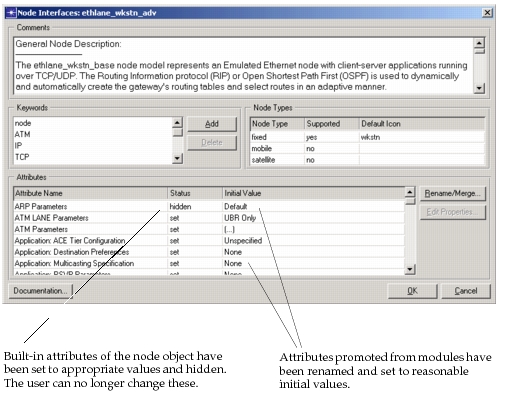
The mechanisms listed in Table 89 apply to built-in attributes of node objects as well as to the object-promoted attributes originating in the node model. For example, the “condition” attribute of a node object can be renamed, or hidden using a node model’s attribute interfaces. The following figure shows such a specification in the Node Editor’s Node Interfaces dialog box.
Figure 172: Attribute Interface Descriptions for a Node Model
Additional Node Model Interfaces
The Node Model Attribute Interfaces also regroup several other parts of a node’s interface, though these are unrelated to attributes. These are listed in the following table and described in detail in “Modeling Framework” on page 80.
Table 90: Additional Node Model Interfaces
| Interface | Description |
|---|---|
| Keywords | Each node model can carry a set of keywords that are used to identify its relevance to particular network modeling efforts. Users of the Project Editor can specify keywords of interest to display only those models that are useful to them in the editor’s Object Palette. |
| Comments | A textual description of the node model allowing the node model developer to provide any desired information to the model user. Typically information in the comments includes: node model functionality (i.e., what sort of real-world device it represents); physical link interfaces; significance of major attributes; compatibility with other models; available statistics, etc. |
| Supported Node Type | Specifies whether the model is capable of being used by fixed, mobile, or satellite nodes, or any combination of these. |
Node Model Derivation
In certain cases, node model developers, or even model users, will find that an existing node model has all of the capabilities that they require, but in addition provides too much flexibility to the model user. While providing extra capability may not seem like a problem, it may in fact be undesirable for a variety of reasons, which are listed in the following table.
Table 91: Reasons to Specialize a Node Model
| Problem | Details |
|---|---|
| Complexity can overwhelm end-user | The more flexible and parameterized a model is, the more complex it is for an end-user to configure. In many cases, the parameters of a general model will not appear familiar to the end-user and the work required to configure it for each instance will exceed the end-user’s knowledge. If attribute values can be specified in advance and match the user’s requirements, then the node model will be significantly easier to deploy at the network level. |
| Flexibility can permit invalid configurations | The availability of many attributes may provide the opportunity for the user to create an invalid or unintended node configuration. |
| End-user expects particular presentation | The end-user of the node model typically expects a particular interface that matches his experience with similar real-world devices or other models. If this interface can be realized, the model will be much more “user-friendly” |
In these problem situations, users are seeking what we can refer to as a specialization of the node model. A specialized version of the node model is less general and flexible, but is tailored to the needs of a particular application, or at least a more specific application than the original model. To create a specialization of a node model, Modeler provides a mechanism called model derivation. Model derivation allows the mechanisms that are available in the Node Model Attribute Interfaces to be applied to an existing node model. The result of this operation is a new node model, called derived node model that depends on the original model, which is called the parent node model. The parent node model provides all information that is structural, such as the node model diagram, including modules and connections.
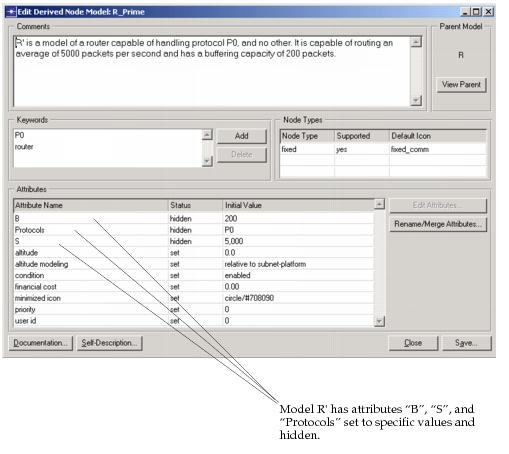
For example, suppose we have a complex and general model R of a router capable of handling several different protocols P0, P1, and P2, which processes packets at a selectable speed S, and which has a selectable buffer size B for holding packets awaiting processing. Now consider that we have an application that requires a router that can handle only protocol type P0, that has S = 5000 packets/sec., and B = 200 packets. By creating a model R' derived from R, we can quickly achieve our goal. In the derivation of R' we can set appropriate attributes of R to their required values (assuming an attribute exists to control the supported protocols) and we can set the status of these attributes to hidden to prevent network-level users from changing these settings.
The following figure shows the derivation that would be performed to obtain <R'> from <R>. See “Modeling Framework” on page 80 for an in-depth description of model derivation.
Figure 173: Specialization of Model R to Generate Derived Model R’