Incremental Device Configuration Import (DCI)
You can modify the device configuration source files after an import from NetCollector, then perform an incremental import through DCI. This allows you to perform “what if” analyses on the imported network model. The workflow is described in Procedure 3.
Procedure 3: Incremental DCI over NetCollector Import
-
Import topology from NetCollector. Be sure to check “Include collected output files” on the Options tab.
-
Edit and save collected output files.
-
Import topology from Device Configurations.
-
Select Topology > Import Topology > From Device Configurations…
-
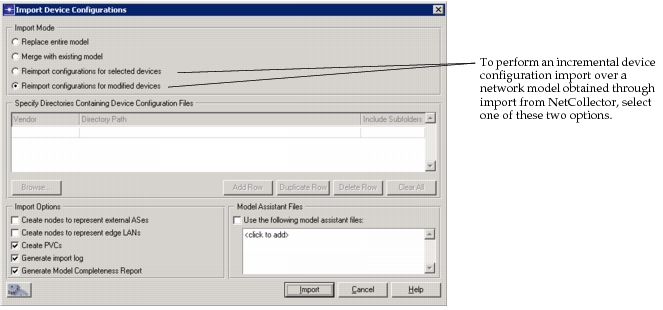
Choose to “Reimport configurations for selected devices” or “Reimport configurations for modified devices”. See the dialog box in Figure 24.
-
Select Import Options and Model Assistant Files to use (optional).
-
Click the Import button.
-
-
Note the changes in the device attributes for modified devices.
Note: No changes affecting topology are accepted during the incremental import. These unallowed changes include addition/deletion of interfaces, interface status changes (i.e., shutdown/no shutdown), and changes to IP addresses.
Figure 23: Import Summary - DCI over NetCollector Import
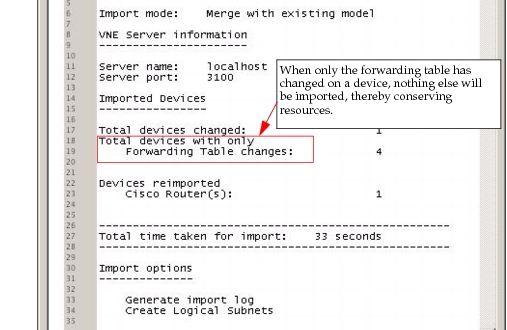
Figure 24: Incremental DCI over Import from NetCollector