Parallel Simulation Concepts
When performing discrete event simulation (DES), Modeler can take advantage of multiprocessor workstations to increase simulation performance. This is done by using a parallel simulation kernel instead of the default sequential kernel. The parallel kernel provides full support for parallel execution of events that meet all of these requirements:
- The events are MT-safe.
- The events are scheduled for the same time window.
- The events are scheduled for different nodes or modules (depending on the serialization level).
The following sections elaborate on these requirements.
Note: Because the execution sequence of events can vary in a parallel simulation, different runs with the same input can yield different results and different numbers of events.
MT-Safe Events
The phrase “MT-safe” refers to code that can be executed safely in a multi-threading environment. MT-safe events are those that are
- scheduled for a process model that uses MT-safe code, or
- transmission/reception events using MT-safe pipeline stages
Many portions of the standard model library are MT-safe, including:
- Default pipeline stages
- WLAN pipeline stages
- WLAN MAC process model
- UDP portion of the MANET stack
In addition, Modeler supplies many MT-safe APIs that you can use in your custom models. For information about which Riverbed APIs are MT-safe, see “Multi-Threading Safety” on page 11. For information about making your custom models MT-safe, see Making Models Parallel-Safe.
The parallel kernel can execute both MT-safe and non-MT-safe events, allowing you to mix models designed for parallel and sequential use in your projects. Events scheduled for a non-MT-safe process model will always be executed sequentially, as are all events at simulation time 0 and all end-of-simulation events.
Legacy code (process models, pipeline stages, wireless domain models, and so on) that has not been updated for parallel execution is executed sequentially. To support the combination of MT-safe and non-MT-safe legacy code in the same simulation—even in the same parent process/child process hierarchy—the parallel simulation kernel follows these rules to determine how events are executed:
- A module can process events in parallel if the root process model of the module and all dependent process models are declared MT-safe.
- A transmitter or receiver module can process events in parallel if all pipeline stages and wireless domain code associated with the module are declared MT-safe.
- Sequential events are processed after all parallel events are complete.
By default, wireless domain models are not considered MT-safe unless they are explicitly marked as such by the model developer. To declare a wireless domain model parallel-safe, use the Interfaces > Support > Parallel Execution menu item in the Wireless Domain Editor.
Process models can be classified as MT-safe, MT-unsafe, or (by default) unknown. You can use the Interfaces > “Parallel Execution Support” menu item in the Process Editor to specify a model’s parallel safety. The “unknown” classification lets you experiment with parallel execution by trying to run model code in parallel. During execution with a parallel kernel, process models with unknown parallel safety will be assumed to be MT-safe or not, depending on the “parallel_sim.unknown_process_mt_safety_handling” preference. If parallel execution fails when this preference is set to “assumed_safe”, you can either iteratively fix any parallel-safety issues or explicitly mark certain processes as “unsafe”.
Parallel Execution Time Window
The parallel simulation kernel can execute events in parallel if they are “instantaneous”—that is, if they occur at the same (or nearly the same) simulation time. To be considered instantaneous, events must be scheduled for execution in the same parallel execution window (also called cell). For example, if two events are scheduled for times 1.01 and 1.05 and the parallel execution window is set to 0.10, the events are candidates for parallel execution (assuming they meet other criteria defined by the simulation kernel).
The larger the window, the greater the number of events that can potentially be executed in parallel and thus the greater the potential gain from parallel execution. However, too large a window will affect the correctness of simulation results. The size of the parallel execution window is specified by the “parallel_sim.event_execution_time_window” preference. It is up to the model developer or the person running the simulation to determine an appropriate value for this preference. The intent is to pick the largest possible value that still produces correct simulation behavior. For guidelines on determining a good value for the “parallel_sim.event_execution_time_window” preference, see Estimating the Benefit of Parallel Simulation.
Parallel Serialization Level
Because Modeler’s state machine for process models is not re-entrant by definition—that is, it can be in only one state at a time—event execution is serialized. Two levels of serialization are available: node level and module level. The serialization level determines the granularity of parallelization, which in turn affects how parallelism is managed and how much work is needed to make existing models MT-safe.
The serialization level used by a simulation is determined by the “parallel_sim.serialization_level” preference. By default, node-level serialization is used. The following table compares the serialization levels.
Table 128: Comparison of Node-Level and Module-Level Serialization
| Node-Level Serialization | Module-Level Serialization |
|---|---|
| At most, one event per node instance can be executed at any time. | At most, one event per module instance can be executed at any time. |
| Two MT-safe events scheduled for the same time window are executed in parallel only if they are for different nodes. | Two MT-safe events scheduled for the same time window are executed in parallel only if they are for different modules. |
| Converting existing models to MT-safe status is easier: • Forced interrupts between modules in the same node do not cause deadlock issues |
Converting existing models to MT-safe status is more involved: • Forced interrupts between modules in the same node cause potential deadlock issues |
| Coarse-grained parallelism | Fine grained-parallelism |
Parallel Execution Examples
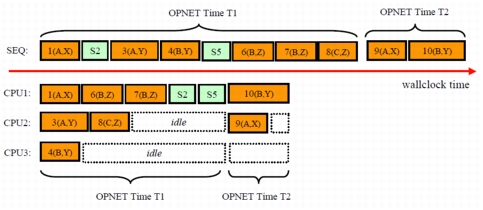
The following figures illustrate how events are scheduled by the parallel kernel. In these figures:
- Times T1 and T2 represent different parallel execution windows (cells).
- The size of each event box represents the wall clock time needed to execute that event.
- MT-safe events (orange) are labeled #(N,M), where # is the event number and N,M indicated the node and module for which the event is scheduled.
- Non-MT-safe events (green) are labeled S#, where S means sequential execution and # is the event number.
Figure 250: Illustration of Node-Level Parallelism
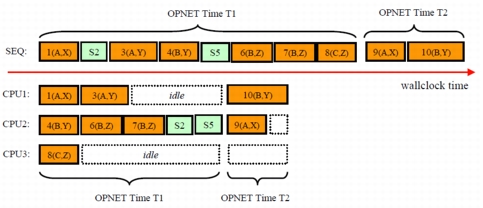
Figure 251: Illustration of Module-Level Parallelism