Running Parallel Simulations
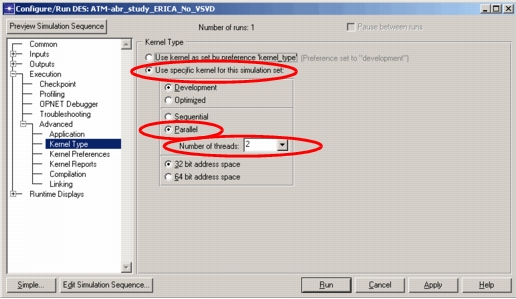
For Modeler to run a simulation in parallel, you must make the following settings on the Kernel Type page of the detailed Configure/Run DES dialog box (Figure 257).
- Select the “Use specific kernel for this simulation set” radio button.
- Select the “Parallel” radio button.
- Specify the number of threads (CPUs) to use for the simulation.
Alternatively, you can accomplish this with the “parallel_sim.num_processors” and “kernel_type” preferences.
WARNING: Requesting simulations to use more CPUs than are physically present and available will degrade simulation performance dramatically.
Figure 257: Settings for Parallel Simulation (Configure/Run DES Dialog Box)
The following error message might be generated at simulation run time.
Problem
Modeler cannot find the number of processors available on the computer to set the value of “Maximum”. The following message appears:
-------------------------------------------------
<<< Warning >>>
Unable to determine number of processors on this computer.
Reverting to sequential simulation.
-------------------------------------------------
Discussion
Windows – The Windows NUMBER_OF_PROCESSORS preference is not defined.
Linux – The system call to find the number of processors failed.
Solution
Instead of using the “Maximum” setting in Modeler, numerically specify the number of processors to be used.