Scaling Traffic—Analyzing the Impact of Traffic Growth
A common approach to conducting traffic sensitivity studies is to import end-to-end traffic and scale it to progressively higher values in a series of scenarios. In each scenario, the effect on a particular stakeholder who runs an explicitly modeled application, is observed. The approach of simulating the “stakeholder’s” viewpoint is illustrated below:
Figure 3: The Viewpoint of a Stakeholder Contending with Background Traffic
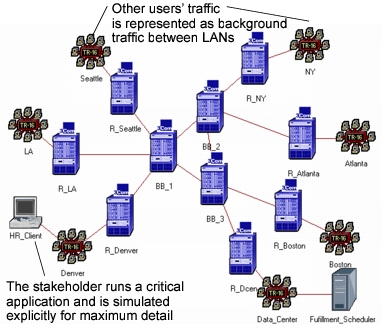
A common approach for a scaled traffic flow study is outlined below:
-
Develop a “baseline” scenario within a new project. You can do this either by importing topology, or by manually constructing the necessary portions of your network’s infrastructure. The baseline scenario typically represents the network’s normal or present-day infrastructure and traffic.
-
Import traffic for the baseline scenario. Browse the traffic to make sure you understand its nature and that it corresponds to your expectations. Revise the traffic matrix if you feel this is necessary to provide a valid baseline.
-
Specify “stakeholder” traffic for applications of interest. These are one or more end-users of the network who run specific applications. Characterize the end-user’s traffic as well as you can based on knowledge of the applications being performed. You may also choose to represent the end-user using measured information, as explained in the SMARTE methodology later in this chapter. In any case, you don’t need to create a large number of users, in general; just position users in parts of the network that are of most critical interest, or where you suspect application performance might be problematic.
-
Choose results to be collected. Run the baseline scenario’s simulation, and view the results.
-
Create duplicate scenarios and scale traffic. For each scenario, edit the traffic matrix and increase the traffic by an appropriate percentage. When scaling traffic, consider if you want to scale both traffic flows and baseline loads (considered generally to be background traffic) and explicit traffic, or only background traffic. In most cases, scaling just the background traffic is desirable, because the traffic increase is due to more users appearing in the network, not to increased activity by individual users. The purpose of having explicit traffic in the simulation is to represent one or more typical users accurately. Their particular traffic should be negligible when compared to the background traffic. Therefore, not scaling their contribution should not significantly dilute the selected scaling factor.
Scaling traffic can be performed via the “Traffic Scaling Factor” Simulation attribute. (Recall that simulation attributes are specified under the “Configure Simulation” dialog box in the Project Editor). The “Traffic Scaling Mode” simulation attribute determines if you will scale only the background traffic, or all traffic (including explicitly modeled applications).
-
Run simulations for the duplicated scenarios. Use the “Compare Results” operation to understand how scaling traffic impacts application performance.
You might prefer to use the “Specify Traffic Growth” operation in order to quickly run a series of scenarios and collate and compare results in a more automated fashion.