Creating Cross Traffic for a Specific Network Element
Certain network components do not provide a background-load attribute, as do LANs or servers. In particular, as of this printing, router and switch models do not allow you to model the effects of additional load based on an attribute belonging to the device itself. However, representing such a load is sometimes necessary in order to model the “rest of the network” in terms of its effect on the component of interest. If the load submitted to this device is known (for example, from a measurement), it is typically preferable to avoid constructing a full model of all other parts of the network.
If the device of interest has no baseline load attribute, you can still easily specify the desired volume of traffic flowing through the device of interest.
Procedure 1: Specifying Traffic through a Device That Does Not Have a “Background Utilization” Attribute
- “Sandwich” the device between two routers. In other words, create two routers with the correct layer 2 technologies to connect to the device of interest. For instance, if the device is a router with available Token Ring ports, choose two routers that also have Token Ring ports (you can even use the same router model as the device of interest in this case). Connect each router to the device of interest using a bidirectional point-to-point link. These are “artificial routers”, used only to generate the background load you seek to introduce for the device of interest. They represent the “rest of the network” from this device’s point of view. You can also use LANs instead of routers to represent proxy traffic sources.
Figure 4: Proxy Objects Provide Background Traffic Across a Router
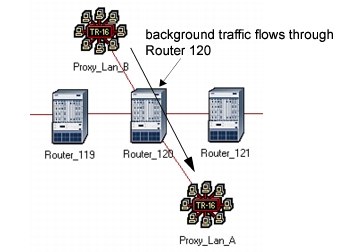
- Determine the background traffic you want to impose on the device of interest. Devices like routers and switches are mostly affected by the number of packets they process, not the number of bits. Therefore, the volume in terms of packets per second is really what matters. This is a number you will generally obtain from measurement or monitoring tools available in your environment. It may also be an estimate you have made based on statistics collected from other simulations.
- Specify the background traffic between routers. Which router you choose as the source or destination is not important because your goal is only to make packets flow through the device of interest. Go to the traffic browser to specify the desired volume of packets per second flowing through the device. The number of bits per packet is not as important. Choose a number that represents a typical frame size for the LAN technology being used to connect the devices.
There is one caveat to the previous procedure when the device of interest is a router. The issue stems from the fact that certain router models account for concurrent processing of packets on distinct slots. This is controlled by the “IP Processing Scheme” attribute of the router, which is typically available on advanced models. You will need to know if the device under test is a router which uses a processing scheme which is “Slot Based Processing”. If so, traffic flowing through the router on certain ports may not affect traffic flowing through on other ports. This depends on whether the ports belong to the same slot of the router. Accordingly, if the background traffic setup between the two “artificial” routers is not on the same slot as other traffic of interest, the desired effect may not be obtained. Therefore, in order to accomplish sharing of router resources by the background and the explicit traffic, you may have to carefully control the ports that are selected for each of the links attached to the router.