Configure Initiating Node Dialog Box
Figure 39: Configure Initiating Node Dialog Box
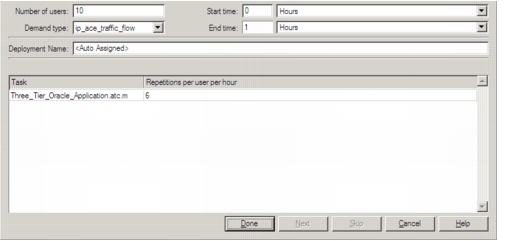
The Configure Initiating Node dialog box appears only when the Assign Nodes dialog box is open. This box appears when you do the following actions:
- Assign a node to an initiating tier. If you assign multiple nodes, this dialog box appears multiple times (once for each assigned node)
- Right-click on an assigned node and choose Edit Configuration from the pop-up menu.
You can specify the following information in this dialog box:
- The type of demand model used to create the traffic flows (Demand Type pull-down menu)
- The name used in the Traffic Center treeview when you view traffic flows by creation method (Deployment Name field)
- The simulation interval during which the node initiates the application task (Start Time and End Time fields)
- How often the node initiates the application task (Number of Users and Repetitions per User per Hour fields)
Note: You can specify this information for initiating nodes only.
The following table lists the items in the Configure Initiating Node dialog box.
Table 11: Configure Initiating Node Dialog Box
| Item | Description |
|---|---|
| Apply to X remaining nodes | This option appears only when you assign multiple nodes to an initiating tier. If you check this box, the current settings are applied to the remaining nodes in the selection set. |
| Demand Type | The demand model used to model the traffic flows for this application. |
| Deployment Name | The name used in the Traffic Center treeview when you view traffic flows by creation method. |
| End Time | The simulation time when the node no longer initiates sessions of the application. |
| Number of Users Repetitions per hour per user |
Traffic scaling factor. These fields determine the rate (in repetitions per hour) at which the node initiates sessions of the application task. This scales the traffic for all conversation pairs that support the application sessions initiated by the current tier. Example: Suppose you import a three-tier (client—web_server—db_server) application task. You set Number of Users to 10 and Repetitions to 10. This results in 100 repetitions of the application session per hour. As a result, the import engine scales the traffic on the related conversation pairs (client<—>web_server and web_server<—>db_server) by a factor of 100. |
| Start Time | The simulation time when the node starts to initiate sessions of the application task. |
| Task | The task to be repeated during the specified interval |
For more information, see “Verifying Traffic-Flow Imports“.