Specify Tasks Dialog Box
The Specify AppTransaction Xpert Tasks dialog box appears after you choose Traffic > Import Traffic Flows > From AppTransaction Xpert. You use this dialog box to specify the AppTransaction Xpert tasks you want to import.
Figure 37: Specify Tasks Dialog Box
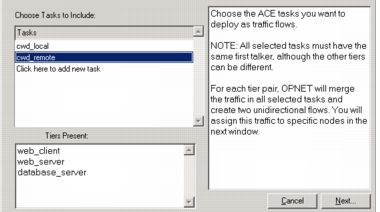
You can import multiple tasks in the same operation. The one restriction is that all tasks must have the same first talker. This is the tier that sends the very first packet in the task, and thus starts the application.
When you import multiple tasks, the import merges the traffic. For each tier pair, the resulting flows reflect the combined traffic levels from all imported tasks. For example, suppose you import two tasks that record an FTP application between a client and a server tier. Total server-to-client traffic is 50 kilobytes in the first task, and 100 kilobytes in the second task. The resulting server-to-client traffic flow will specify 150 kilobytes, or the sum of the average traffic between the two tasks. (This example assumes that you do not scale the traffic as described in Scaling Transaction Analyzer Traffic.)