The netbiz.ets File
If you are building a Netbiz application, you will need to include the netbiz.ets file in a directory listed in the mod_dirs preference. See File Organization for a description of where to locate this file.
The netbiz.ets file is used to:
- Define the different editors that will be available in the Netbiz project.
- Specify the available resource files that contain custom dialog boxes created with the Dialog Box Editor,
op_etsed. - Specify the available icon databases created with the icon editor.
- Specify the name of the function that will be called when the Netbiz tool starts up.
- Specify the text that appears in the title bar of the main Netbiz tool window (the program banner).
The netbiz.ets file is one example of an editor configuration file. An editor configuration file declares a series of editors. Each editor that is to appear in your application must have an entry in the editor configuration file. The default version of this file is named netbiz.ets and is stored in the <reldir>/sys/configs directory; however, it can be stored in any directory that is included in the mod_dirs preference.
When you start your application, it reads the editor configuration file to find out which tools to make available to the user. By adding entries to the editor configuration file you add more tools to the interface. All additional tools must be based on existing tool types. By removing entries in the editor configuration file, you remove tools from the user interface.
Analysis of a Sample netbiz.ets File
The following sample netbiz.ets file would result in a session of your application that contains the system menus (which are present as soon as your application is launched), the License Manager, and the Network Editor.
Note: The file shown here is not an actual file; it is illustrative only.
Figure 6: Sample netbiz.ets File
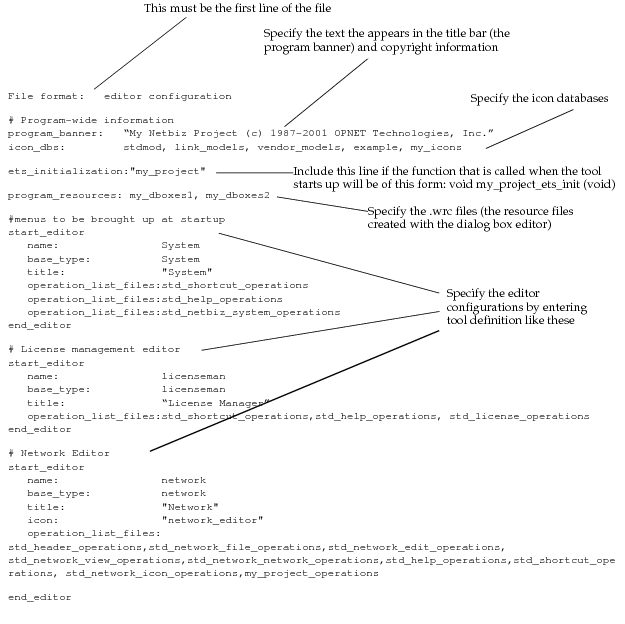
netbiz.ets File Structure
The netbiz.ets file (and any editor configuration file) uses the following structure:
- The first line identifies the ETS script as an editor configuration file.
- Following the first line are global parameters that use the form
<attribute name>:<attribute value>.program_banner. This attribute specifies a string that is to appear in the title bar of the application window. The string must be within quotation marks. If the program_banner preference is specified (in the preferences file, for example), its value overrides this attribute.icon_dbs. This attribute specifies one or more icon database files (separated by commas) that will be loaded during startup. These icon database files must be found in the current model directories. These icon database files can be created and edited within the ODK application itself. If the icon_dbs preference is specified (in the preferences file, for example), that list is added to this list.program_resources. This attribute specifies one or more user-interface resource files (separated by commas) that will be searched for dialog box descriptions. These resource files must be found in the current model directories. You can create and edit resource files with theop_etsedutility.ets_initialization. This attribute specifies one or more ETS library files (separated by commas) that will be loaded at program startup and their initialization functions invoked. The initialization function must have the name<ets_library_name>_ets_init, take no arguments, and return no value. The ETS library files must be found in the current model directories.
- Following the global parameters are blocks of tool entry definitions. Each entry definition begins with the line “start_editor” and ends with the line “end_editor”. In between, attributes describing the tool are presented in the form
<attribute name>: <attribute value>.name. This attribute is a unique string that the ODK application uses internally.base_type. This attribute is the name of the default tool that the tool entry is based on. Table 3 lists the valid values for this attribute.title. This attribute is a string that the ODK application displays in the title bar of the tool’s window. It should, therefore, be a word or phrase that is meaningful to the user. The string must be in quotation marks.operation_list_files. This attribute points to the ETS files that configure a tool’s menus and menu items. You may include more than one operation list file by separating the file names with commas or by repeating this attribute.startup_function_library. This attribute specifies a single ETS library file that will be loaded when an editor of this type (currently only editors with the base type of “project”) is opened for a new (but not for an existing) file. The library is loaded so its startup function can be invoked. The startup function must have the name<ets_library_name>_ets_startup, take no arguments, and return no value. This ETS library file must be found in the current model directories.
- Lines with a “#” as the first character of the line are considered comments and are ignored.
Table 3: Tool Base Types
| Attribute Value | Corresponding Tool |
|---|---|
| System | system window |
| ace | Application Characterization Editor |
| anim | Animation Viewer (op_vuanim) |
| antenna | Antenna Pattern Editor (requires Wireless module) |
| etsconfig | ETS Configuration File Editor |
| etssrc | ETS Source Editor (C code) |
| etssrc_cpp | ETS Source Editor (C++ code) |
| extsrc | External Source Editor (C code) |
| extsrc_cpp | External Source Editor (C++ code) |
| filter | Filter Editor |
| gdf | Generic Data File Editor |
| ici | ICI Editor |
| icon | Icon Database Editor |
| licenseman | License Manager |
| link | Link Model Editor |
| modulation | Modulation Curve Editor (requires Wireless module) |
| network | Network Model Editor |
| node | Node Model Editor |
| orb | Orbit Viewer (op_vuorb) (requires Wireless module) |
| packet | Packet Format Editor |
| path | Path Model Editor |
| PDF Editor | |
| plstage | Pipeline Stage Editor (C code) |
| plstage_cpp | Pipeline Stage Editor (C++ code) |
| probe | Probe Model Editor |
| process | Process Model Editor |
| project | Project Editor |
| simulation | Simulation Sequence Editor |
| wrc | Dialog Box Resource File Editor (op_etsed) |