Device Models
Devices comprise the majority of the objects in the standard model library. They correspond to a wide class of network hardware, including the following:
- Routers
- Switches
- Hubs
- Workstations
- Servers
- Firewalls
- Printers
As you can see, devices essentially correspond to the boxes, that is, the chassis-type or rack-mounted systems in your network. They represent the hardware that performs the information transmission and processing in the network, ranging from simple repeaters like hubs, to content and computation servers, like mainframe computers. Of course, these devices must not consist solely of hardware; most of them contain large numbers of software models, spanning appropriate layers of the protocol and application stack. What’s inside a device depends on what its function is. For example, a typical router model will contain hardware and software models of Ethernet, PPP, and perhaps other Layer-2 protocols. It will also contain routing protocols such as RIP, OSPF, IGRP, and BGP4.
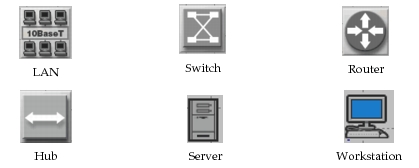
The standard model library presents device models to you graphically. Typically, you will select these objects from the object palette where they appear graphically, though in some cases, you may choose their name from a menu of available models. Devices appear as icons as soon as they are deployed in your network model. The standard model library follows conventions (third-party or supplemental models may not) for the appearance of each type of device, as shown in the following figure.
Figure 18: Graphical Conventions for Network Objects