Support for Multiple FWSMs
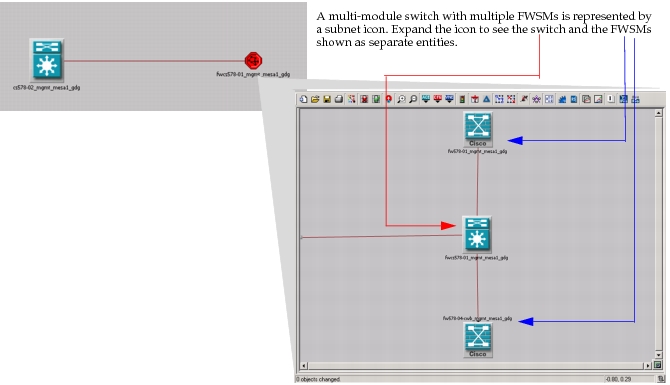
This section describes the support for multiple FWSMs on an imported switch or router/switch. (Preparation for import was described in Configuring NetCollector for Multiple FWSMs.). When you have multiple FWSMs on a single switch, the switch is collapsed into a subnet icon, as shown in Figure 157.
Figure 157: Multiple FWSMs in a Switch
There are several combinations of the router or router/switch and the add-on modules: MSFC and FWSM. As shown above, the imported device is either represented as a subnet of multiple devices or as a single device. The support and configurations are described in the table and in the figure below.
Table 27: Supported Topologies for Multiple FWSMs
| Device Type | Modules | Dual MSFC Sync/No Sync | Topology¹ |
|---|---|---|---|
| Cisco Catalyst 6500 | Multiple FWSMs | Subnet (B) | |
| • Route Switch Module (RSM) • Single FWSM |
Firewall switch | ||
| • RSM • Multiple FWSMs |
Subnet (B) | ||
| • Dual MSFCs • Single FWSM |
Sync | Firewall switch | |
| • Dual MSFCs • Multiple FWSMs |
Sync | Subnet (B) | |
| • Dual MSFCs • Single FWSM |
No sync | Subnet (A) | |
| • Dual MSFCs • Multiple FWSMs |
No sync | Subnet (C) | |
| Cisco 7600 Router | Single FWSM | Firewall switch | |
| Multiple FWSMs | Subnet (B) |
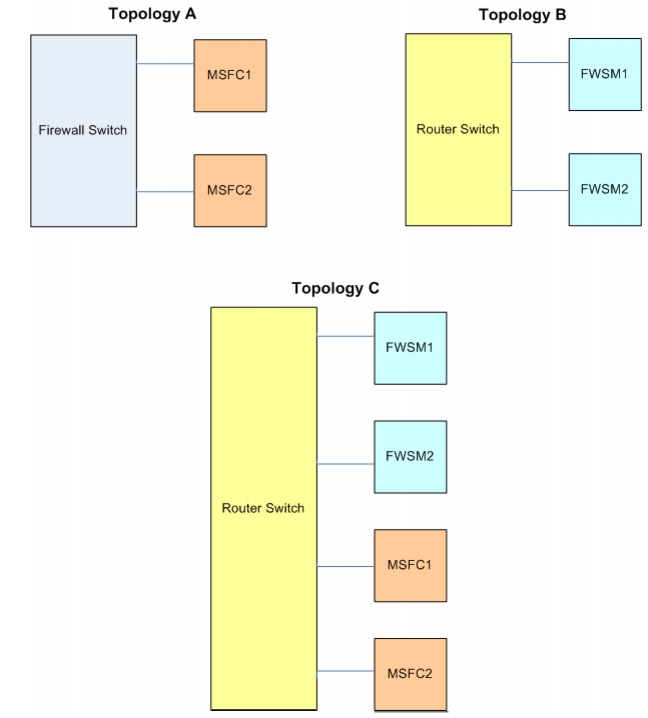
Note 1: See Figure 158 for a visual description of each subnet topology type.
Figure 158 demonstrates the topologies supported, as indicated in Table 27. Each of the topologies shown here will be collapsed inside of a subnet icon. Double-click the subnet icon to view the router or switch and the configured modules, as shown in Figure 157.
Figure 158: Multiple FWSM Topologies